| Readme: | Short: FlatPapillon Skin for MorphOS 3.16 and above
Author: Christophe "Highlander" DELORME
Uploader: chris.highlander@free.fr (Christophe DELORME)
Type: pix/theme
Version: 1.4 (2026-09-06)
Architecture: ppc-morphos
ABOUT
=====
Since the release of MorphOS 2.0 in June 2008, the OS has used the Ferox
skin as the default, and it remained so until the 3.12 release in 2019.
In 2020, MorphOS reached version 3.13 and finally switched to the Origo
skin, still following previous main visual guidelines.
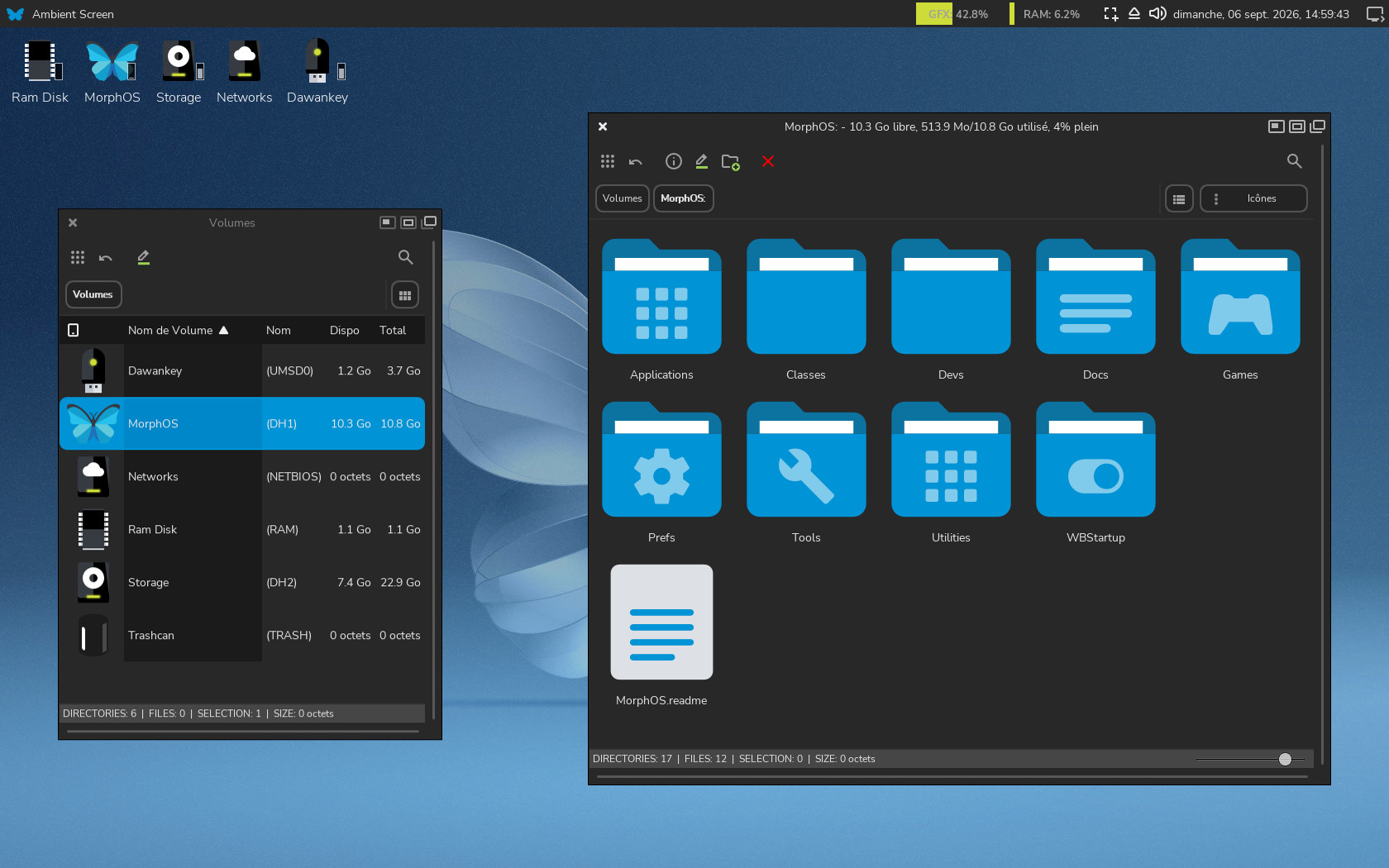
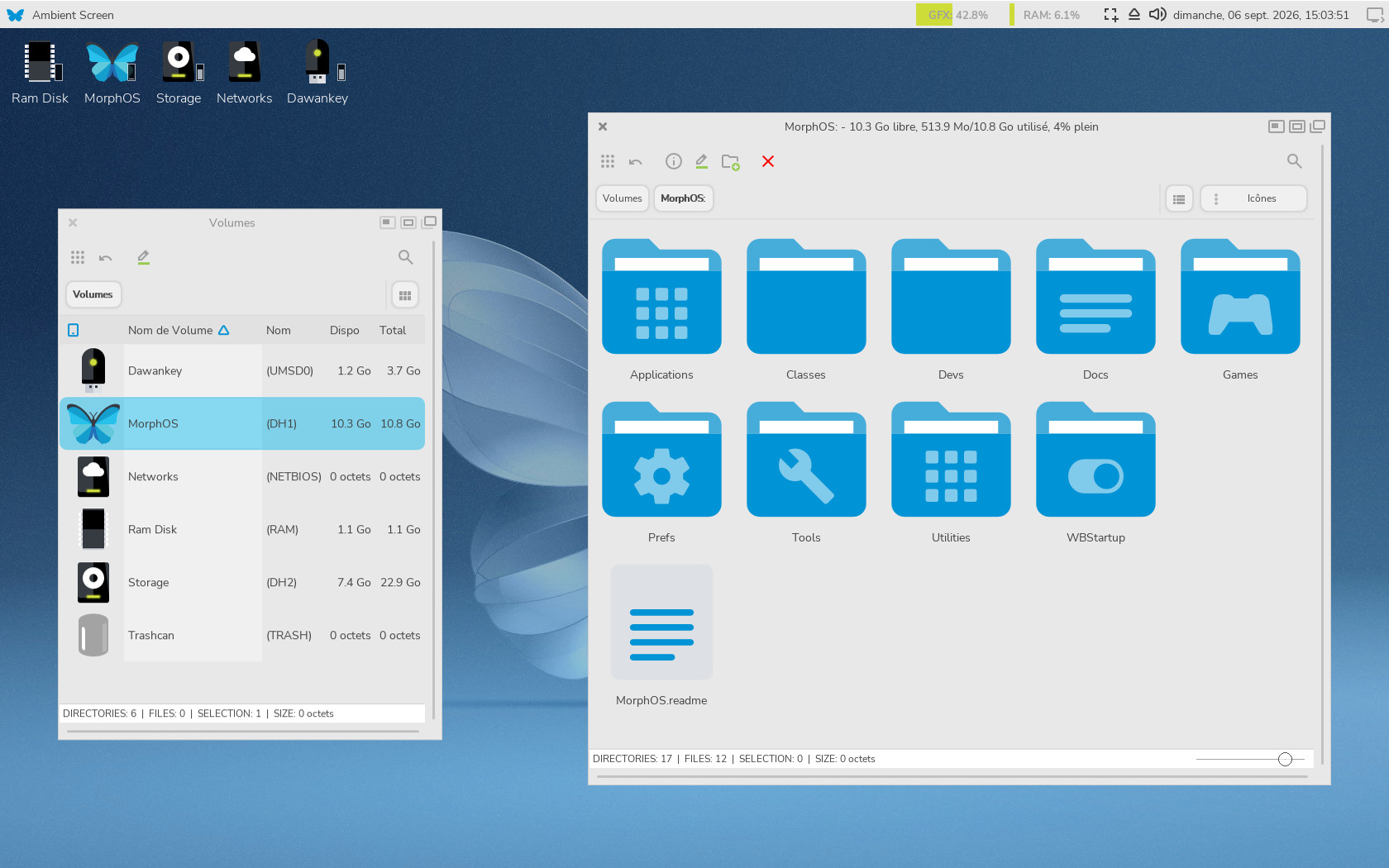
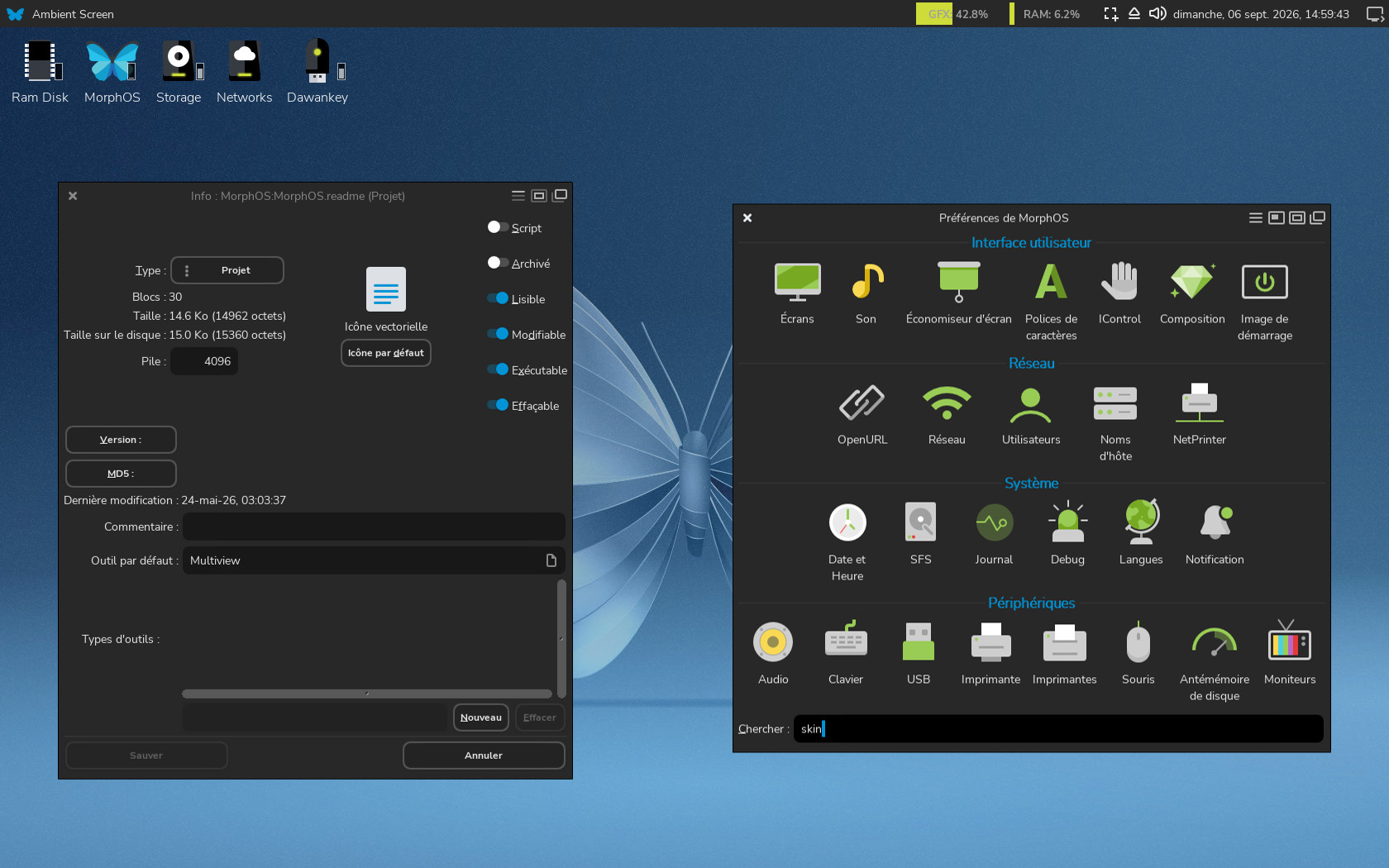
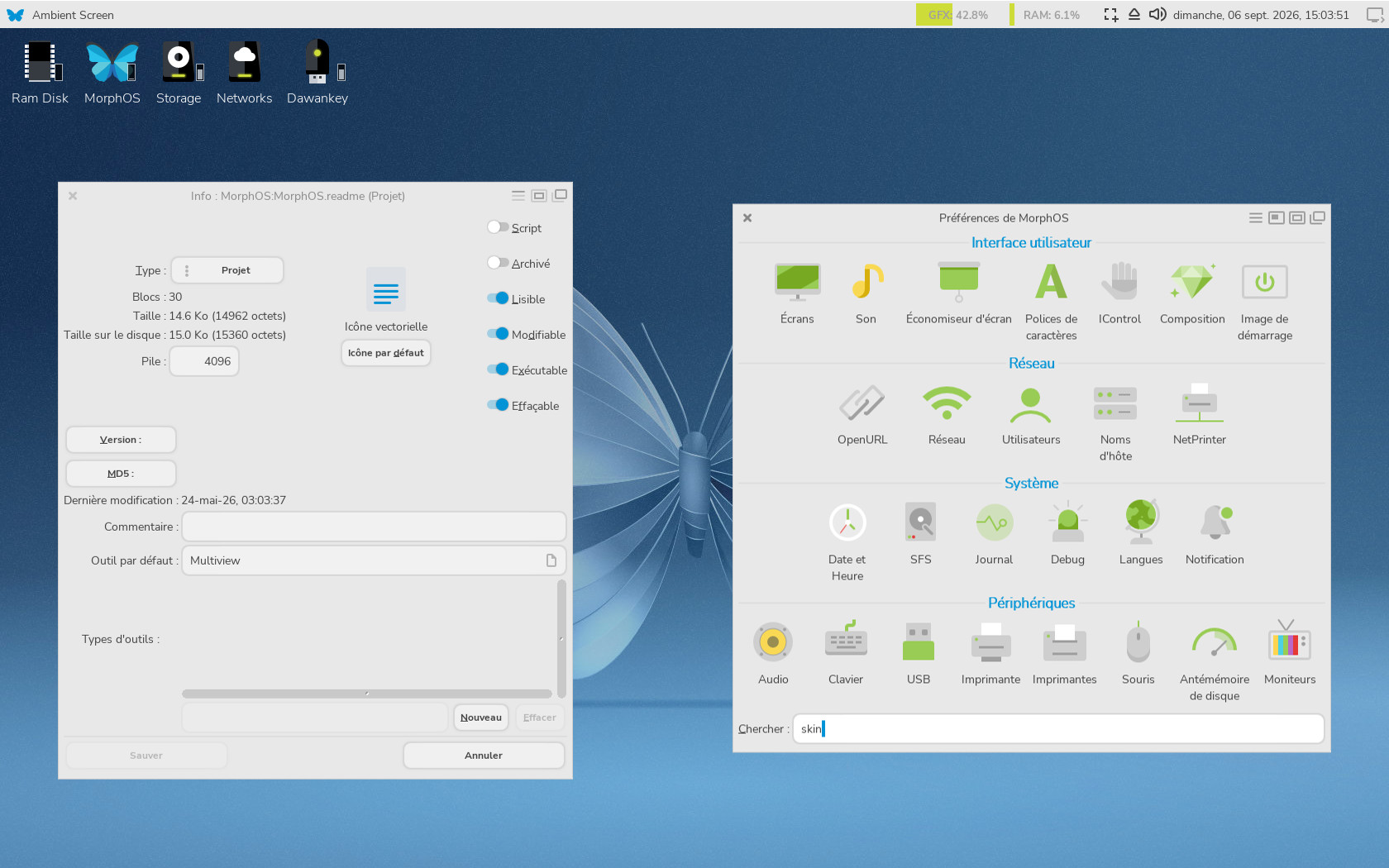
As a system user since its release and attentive to the visual appareance
of my OS, I propose to modernize its appareance by submitting a clean
interface available in two themes according to current trends.
I hope you'll enjoy the new MorphOS experience :)
REQUIREMENTS
============
- MorphOS compatible hardware
- MorphOS 3.16 and above
- Enhanced Display activated for better rendering (optional)
- Some hard disk space on SYS: (The project files take around 2.7 Mo.
You have to add backup files too that depends of your actual system)
CONTENT
=======
- FlatPapillon.guide (amigaguide documentation)
- Install script (installer)
- readme.txt file
- Switch Light-Dark script (amigados)
- install-data/Lua scripts (luax)
- install-data/FlatPapillon_banner.png picture (installer)
- install-data/Restore script (installer)
- SYS/ Data sorted by MorphOS tree structure
(graphical assets and settings files)
USAGE
=====
INSTALL
-------
An installer script is available to install or update the whole
FlatPapillon package. It includes the skin (declined in light and dark)
and several assets like icons, fonts, settings...
Don't forget to reboot your system to see changes.
UPDATE
------
The install script will check which FlatPapillon version you are currently
using and suggest that you update.
(i) If you are using the latest FlatPapillon skin,
the install script will ask you to repair files
that have been replaced by a recent MorphOS
update ONLY -OR- reinstall FlatPapillon
RESTORE
-------
Don't worry, original ones will be stored and available in:
SYS:Storage/GetMyDefaultSkinBack_*/ directory
(sorted by date, including an auto generated restore script that will get
your lovely and cherished initial MorphOS setup back)
(i) Any occurrence of FlatPapillon will be removed
SWITCHING BETWEEN LIGHT & DARK
------------------------------
We all love MorphOS but switching skins is not very smooth.
During installation, FlatPapillon will ask you to choose between
light or dark mode.
If you want to switch to another mode, you have two options:
1. "Switch Light-Dark" script (amigados)
The window will ask you to switch from the detected skin
to the opposite one.
2. Manual way
Follow these steps:
A. MorphOS Preferences > Screens > *MyScreen* > Skin:FlatPapillon*
B. MUI Preferences > Settings button (top left hand corner)
> skin: FlatPapillon*
Don't forget to reboot your system to see changes.
HISTORY
=======
1.4 (2026-09-06) Public release
* New "Install" script (installer)
* New "Restore" script (installer)
* New "Switch" script (amigados)
* EN/FR localisation
* Amigaguide documentation
* Lua scripts (luax)
* readme.txt updated
* Skins updated
* All graphical assets updated
* New graphical assets added
* Global MUI settings updated
* New "more rounded" font family used
* 15/16-bit depth compatibility
* Enhanced color contrast to improve visual accessibility
* PDF Presentation removed
1.3 (2020-03-14) Public release for MorphOS Storage:
* PDF Presentation updated
* Fix unsightly diagonal lines on TrashcanEmpty SVG icon
* MUI Settings/Window (tiny text): color set as normal (like others)
* MUI Settings/List (readonly): frame set visibility to less value
(border column range dark/white to light grey)
* MUI Settings/Buttons/Gauge (active): frame set to (from top in clockwise)
7 1 *20* 1 to avoid OWB download progress bar view seen in
troubleshooting [8]
* MUI Settings/Menus (Cursor): frame set to (from top in clockwise)
*5* 12 *5* 12 to limit big list element access
* Replace mui.prefs for SYS:Prefs/Skins/FlatPapillon*
* Replace SYS:Prefs/Env-Archive/colors.txt FP_Blue_Dark value
(less saturate)
* Replace PNG icons by SVG (SYS/Applications/MPlayer/*.info)
* Add $VER: argument to SYS:Prefs/Skins/FlatPapillon*/SkinConfig file
* Set FlatPapillon's SkinConfig version from 1.5 to 1.3
(to be equal to public version)
* Delete some comment lines in SVG *.info files
(thx Sprocki for sed command line)
* Replace "64.001" width by "64" in SVG *.info files
(thx Sprocki for sed command line)
* Delete "Base64" term in some SVG *.info files
(thx Sprocki for grep command line)
* Modify Check mark & Radio button aspect
(MUIGfx/FlatPapillon*/RadioButton_framed.mim & CheckMark_framed.mim)
* Modify MorphOS Settings > Language icon
(MOSSYS:Prefs/Gfx/Panel/Locale.png
& MOSSYS:Prefs/Gfx/Listview/Locale.png)
* Modify MorphOS Settings > Bootpic icon
(MOSSYS:Prefs/Gfx/Panel/BootPic.png
& MOSSYS:Prefs/Gfx/Listview/BootPic.png)
* Modify MorphOS Settings > Blanker icon
(MOSSYS:Prefs/Gfx/Panel/Blanker.png
& MOSSYS:Prefs/Gfx/Listview/Blanker.png)
* readme.txt updated
* Button frame modified for light theme (MUIGfx/Frames/FlatPapillon/
Slider2_GlowBut.png)
* Move Wallpapers and Bootpictures from SYS:* to MOSSYS:*
* Generate new FlatPapillon wallpapers
* Button frame modified for dark theme (MUIGfx/Frames/FlatPapillon_BLK/
Slider2_GlowBut.png)
* OWB MediaTheme images updated (OWB/Resource/MediaTheme/)
* Update mui.prefs for FlatPapillon and FlatPapillon_BLK
(MOS:Prefs/Skin/FlatPapillon*)
* MOS:Prefs/Ambient/Ambient.prefs added (because of penspec problem with
Ambient arexx script)
* Ambient script: fix "SetPrefs TOOLBAR_DEFINITION" (thx Piru)
* FlatPapillon theme for FlowStudio
* Keyinput flags done! (MOSSYS:Data/Screenbar/Keyinput/Flags/14/)
* More grey contrast on prefs icons (MorphOS Settings, MUI Settings,
Screenbar Settings)
* FlatPapillon_BLK data to install script added
* FlatPapillon: Set all extra colors to greyscale
* FlatPapillon & FlatPapillon_BLK: Harmonisation of Ambient/OWB/
SongPlayer/Mplayer/ED to work with both themes
* Merge both skin with one install
* FlatPapillon_BLK: Change global dark color #37434E to #2D2D2D (including
all images assets and values)
* FlatPapillon: Change global light color #F3F3F3 to #EEEEEE (including
all images assets and values)
* SYS:Prefs/MUIGfx/FlatPapillon* images replacement (Pullopen.mim,
Volume.mim, HardDisk.mim)
* Full install script for FlatPapillon Skin
(including backup/restore script)
* FlatPapillon/FlatPapilloon_BLK: Modify SkinConfig and Titlebar images
(more height)
* Add Ambient sound at startup
* Add SYS/Prefs/Ambient/Advanced.conf
* Ambient setprefs script rexxsyslib.library friendly
* Global MUI > Lists (FlatPapillon): Active color set to R126 G209 B233
(bye bye grey)
* Ambient Settings > Lister (FlatPapillon): Set "Selected file" and
"Selected directory" to pure WHITE
* Global MUI settings > PowerTerm > XTerm : Last main *white* color
set to black (on FlatPapillon)
* Global MUI settings > Groups > TAB font style and color to Roboto /
Dark blue
* add default.info file in SYS:Prefs/Presets/Deficons/application
* SkinConfig: Add WINDOWBRIGHTEDGE and WINDOWDARKEDGE values
to draw 1px line around the window
(thanks new MOS 3.1x skins for the hack)
* Mui settings: Add smooth border to button and -1px to font size
* Deficons: added in SYS:prefs/Presets/Deficons/
internal/default.info
multipart/default.info
message/default.info
* MorphOS Settings Icons:
Smaller display of Fonts (MOSSYS:Prefs/Gfx/Panel/Font.png)
Updated mouse speed icons (MOSSYS:Prefs/Gfx/Panel/Mousespeed*.mim)
* New Flags icons (MOSSYS:Prefs/Gfx/Flags/*.flag)
* set global MUI buttons/button font size to 18
* set global MUI buttons/slider font size to 19
1.2 (2017-10-27) Internal release for Amiga Germany 32 event
* SVG icons inside
* PDF Presentation
1.1 (2017-07-08) Personal release
* set 2 themes (light and dark)
1.0 (2015-11-15) Personal release
TROUBLESHOOTING
===============
MAIN MORPHOS ISSUES TO FIX
--------------------------
[1] MorphOS should load automatically mui settings files while choosing a
new skin (Global mui settings, screenbar mui settings, ambient mui
settings, ambient settings) - MT#7928
[2] Ambient Arexx Script: I can set penspec of element with GetPrefs, but
SetPrefs of penspec doesn't work (like m2). (I have to overwrite
SYS:Prefs/Ambient/Ambient.prefs to avoid this point >.<) - MT#7465
[3] MUISkin internal patch doesn't save font information and external MUI
classes settings
OPTIONAL MORPHOS ISSUES TO FIX
------------------------------
[4] I didn't find a way to disable knob in sliders.
[5] Allow transparency to background frame images (Example: Personal images
for slider, progress bar, ambient scroll bar...)
[6] Ambient settings panel images and warning requester images are
hardcoded and cannot be modified - MT#7466
[7] Allow personal images "menu" and "toolbar" for Ambient
(SYS:Prefs/Ambient/images/) - MT#7464
[8] In MUI settings, allow changing font color of:
-[Lists] Each state (instead of only one choice) would be welcome
-[Buttons] Active text button color
[9] Old def_tool, def_drawer and def_disk can be seen while refreshing
screen/window (They might be hardcoded :/) - MT#7467
[10] Some Screen Manager MUI Settings icons seem to be hardcoded and
cannot be modified (Titlebar, Energy, Clock, Thermal, Jukebox)
FUTURE
======
- Dedicated boot sound
- More default visual assets replaced
- More SKINHEIGHT options
- Dedicated website
- MorphOS ISO integration (I'm open)
- New skins projects
COPYRIGHT
=========
FlatPapillon is using some Google Material Icons, a free to use icon set
available under the CC-BY license.
The skin is using Open Source Google Fonts too called "Nunito Sans" in
its standard and light versions and "Noto Mono" for fixed width font.
Boot sound is coming from the game "Seiken densetsu 3" by Square on
Super Famicom (maybe the only shamefully stolen asset >.<)
DISCLAIMER
==========
----------------------------------------------------------------------------
/!\ SCRIPTS WILL OVERWRITE SOME MORPHOS AND USER FILES /!\
----------------------------------------------------------------------------
This homemade project is free to use.
I accept no liability for any damage caused to your system, other connected
peripherals or data files in any way by using this package.
This French project was done using:
- SERIF Affinity Designer 1.10.6 under Windows 10
(main skin, SVG Icons, graphical assets...)
- MorphOS 3.1x beta under MacMini G4 (main computer)
- MorphOS 3.1x beta under Powermac G4 (test computer)
THANKS
======
MorphOS Team to allow me to access MOS beta iso & bugtracker.
My dear "FlatPapillon" Betatesters from all over the world.
YOU, if you are a true FlatPapillon user.
|


 Ambient (151)
 FlatPapillon-Skin-1.4.lha