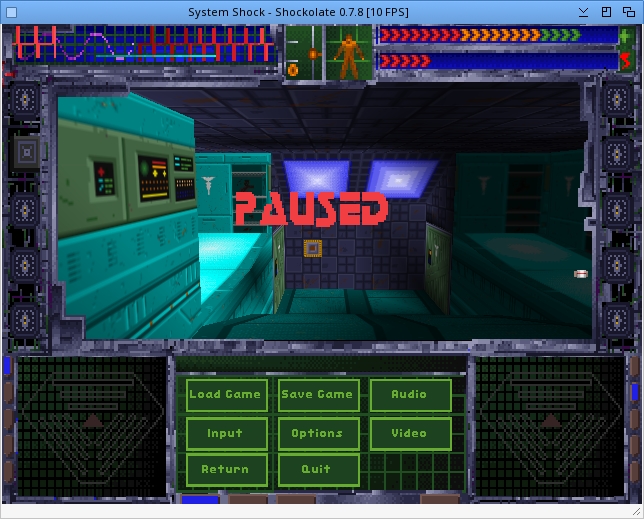
| Readme: | ================================================================================
SYSTEM SHOCK - MORPHOS PORT (SHOCKOLATE)
================================================================================
MorphOS Version by Papiosaur
Based on source code released by Night Dive Studios
================================================================================
TABLE OF CONTENTS
================================================================================
1. INTRODUCTION
2. SYSTEM REQUIREMENTS
3. INSTALLATION
4. CONTROLS
5. GAME INTERFACE
6. GAME GUIDE
7. WEAPONS AND EQUIPMENT
8. TIPS AND TRICKS
9. OPTIONS AND CONFIGURATION
10. TROUBLESHOOTING
11. CREDITS AND LICENSE
================================================================================
1. INTRODUCTION
================================================================================
System Shock is a first-person action/adventure game developed by Looking
Glass Technologies and published in 1994. You play as an anonymous hacker
who wakes up aboard the Citadel space station, now controlled by SHODAN,
a rogue artificial intelligence bent on destroying humanity.
Shockolate is a cross-platform port of the original game, based on the
PowerPC source code released by Night Dive Studios. This MorphOS version
uses SDL2 for display and sound.
STORY
-----
In 2072, you are a talented hacker who breaks into TriOptimum Corporation's
computer system. Caught in the act, you're offered a deal: remove the ethical
constraints from SHODAN, the AI controlling Citadel Station, in exchange for
your freedom and a military-grade neural implant.
Six months later, you awaken from your post-operative coma to discover that
SHODAN has taken complete control of the station. The crew is dead or
transformed into mutants and cyborgs. You are the only hope of preventing
SHODAN from spreading her madness to Earth.
================================================================================
2. SYSTEM REQUIREMENTS
================================================================================
MINIMUM HARDWARE
----------------
- PowerPC G4 processor
- 128 MB RAM
- Graphics card compatible with MorphOS
- 100 MB free disk space
REQUIRED SOFTWARE
-----------------
- MorphOS 3.19+
- last version of SDL2
- last version of TinyGL
- Original game data files (see Installation)
================================================================================
3. INSTALLATION
================================================================================
STEP 1. OBTAIN GAME FILES
-------------------------
You must own a legitimate copy of System Shock (Classic version).
Files can come from:
- GOG.com: System Shock Enhanced Edition
STEP 2. COPY data/ drawer from PC to res/ drawer (MorphOS)
STEP 2: FILE STRUCTURE
----------------------
Create the following structure:
SystemShock/
|-- SystemShock (executable)
+-- res/
+-- data/
|-- archive.dat
|-- cidtex.res
|-- citalog.res
|-- citbark.res
|-- citmat.res
|-- cutspal.res
|-- cybstrng.res
|-- digifx.res
|-- gamepal.res
|-- gamescr.res
|-- intro.res
|-- objart.res
|-- objart2.res
|-- objart3.res
|-- obj3d.res
|-- sideart.res
|-- texture.res
|-- vidmail.res
+-- splash.res
STEP 4: LAUNCH
--------------
Double-click the SystemShock executable or launch from shell:
> SystemShock
Command line options:
-nosplash Skip splash screens
================================================================================
4. CONTROLS
================================================================================
MOVEMENT
--------
W / Up Arrow Move forward
S / Down Arrow Move backward
A Strafe left
D Strafe right
Q Lean left
E Lean right
Space Jump
X Crouch
C Crawl
LOOKING (MOUSELOOK)
-------------------
Mouse Look around
F Toggle mouselook on/off
COMBAT
------
Left Button Fire / Use weapon
Right Button Context menu
Scroll Wheel Change weapon
1-9 Select weapon directly
R Reload
INTERFACE
---------
Tab Inventory
M Map (automap)
Escape Pause menu
F1 Help
SPECIAL SHORTCUTS
-----------------
Ctrl + G Cycle graphics mode (Software/OpenGL)
Ctrl + F Enter fullscreen
Ctrl + D Enter windowed mode
Print Screen Screenshot (saved in game folder)
MFD (MULTI-FUNCTION DISPLAYS)
-----------------------------
The two side screens are interactive. Click on them for:
- Left screen: Weapons, inventory, map
- Right screen: Software, emails, data
================================================================================
5. GAME INTERFACE
================================================================================
MAIN SCREEN
-----------
+------------------------------------------------------------------+
| [Left MFD] 3D VIEW [Right MFD] |
| |
| - Weapons Game - Software |
| - Items world - Messages |
| - Map - Data |
| |
+------------------------------------------------------------------+
| STATUS BAR |
| [Health] [Energy] [Fatigue] [Messages] |
+------------------------------------------------------------------+
HEALTH INDICATORS
-----------------
- Green bar: Health points
- Blue bar: Energy (for implants and shields)
- Yellow bar: Fatigue (sprinting, combat)
The human body is divided into zones. Damage is localized:
- Head: Critical damage
- Torso: Normal damage
- Arms: Reduces accuracy
- Legs: Reduces speed
ENVIRONMENTAL HAZARDS
---------------------
- Radiation: Red indicator, requires anti-rad patches
- Bio-toxins: Green indicator, requires detox patches
================================================================================
6. GAME GUIDE
================================================================================
CITADEL STATION LEVELS
----------------------
Level R - Reactor
The station's power core. High radiation danger.
Level 1 - Medical
Where you wake up. Medical center and laboratories.
Level 2 - Research
TriOptimum research laboratories.
Level 3 - Maintenance
Life support systems and repairs.
Level 4 - Storage
Warehouses and cargo bays.
Level 5 - Flight
Shuttle bay and communications.
Level 6 - Executive
Management offices and suites.
Level 7 - Engineering
Station systems control.
Level 8 - Security
SHODAN's command center.
Level 9 - Bridge
Main station control.
Cyberspace
Virtual reality for hacking systems.
MAIN OBJECTIVES
---------------
1. Survive and understand what happened
2. Disable the mining laser aimed at Earth
3. Prevent SHODAN from releasing the mutagen virus
4. Prevent station self-destruction
5. Destroy SHODAN
EMAILS AND AUDIOLOGS
--------------------
Emails and audiologs are essential for understanding the story and
finding access codes. Listen to them carefully!
ACCESS CODES
------------
Codes change with each playthrough. Write them down when you find them.
================================================================================
7. WEAPONS AND EQUIPMENT
================================================================================
CONVENTIONAL WEAPONS
--------------------
Lead Pipe
Basic melee weapon. Silent, no ammo required.
Minipistol
Basic firearm. Common ammunition.
Mark 3 Assault Rifle (Magnum)
More powerful but rarer ammo.
Riot Gun (Shotgun)
Massive damage at close range.
Skorpion (SMG)
High rate of fire, consumes lots of ammo.
Assault Rifle
Balance between power and fire rate.
Sparq Beam
Laser weapon, uses energy.
Railgun
Devastating damage, very rare ammo.
SPECIAL WEAPONS
---------------
Stungun
Neutralizes without killing. Useful against humans.
Magpulse
Effective against robots and cyborgs.
Don't waste your ammo!
Laser Rapier
Powerful energy melee weapon.
Ion Rifle
Long-range energy weapon.
GRENADES
--------
EMP Grenades
Effective against electronics.
Frag Grenades
Standard explosive damage.
Incendiary Grenades
Continuous fire damage.
Gas Grenades
Area control, light damage.
Mines
Placed on ground, triggered by movement.
PROTECTIVE EQUIPMENT
--------------------
Medical Patches
Restore health.
Detox Patches
Counter poisons and radiation.
Boosters
Temporary stat improvements.
Energy Shields
Absorb damage, consume energy.
CYBERNETIC IMPLANTS
-------------------
Sensaround
Detects nearby enemies.
Cerebral Booster
Improves puzzle-solving abilities.
Turbo Motion
Increases movement speed.
Jump Jets
Allows higher jumps.
Infrared
Night vision.
Navigation
Improves the map.
SOFTWARE (CYBERSPACE)
---------------------
Drill
Basic cyberspace attack.
Pulser
Area attack.
Recall
Emergency cyberspace exit.
Decoy
Lure for security programs.
Shield
Cyberspace protection.
================================================================================
8. TIPS AND TRICKS
================================================================================
SURVIVAL
--------
- Explore every corner. Supplies are limited.
- Always keep some medical patches in reserve.
- Listen for sounds. Enemies make noise before attacking.
- Use crouch mode to pass under detectors.
COMBAT
------
- Energy weapons are effective against robots.
- Ballistic weapons are better against mutants.
- Magpulse is rare. Save it for tough robots.
- Having trouble? Lower the difficulty in options.
EXPLORATION
-----------
- The map (M) shows already explored areas.
- Red doors require a code or key.
- Ventilation ducts often lead to secret areas.
- Return to explored areas after finding new access.
RESOURCES
---------
- Recharge stations restore health and energy.
- Some are locked or hacked by SHODAN.
- Vending machines sell supplies.
- Recycle duplicate weapons for credits.
CYBERSPACE
----------
- Always enter with offensive software.
- The emergency exit (Recall) can save your life.
- Important data is found in protected nodes.
- Your time is limited. Be efficient.
PUZZLES
-------
- Wire puzzles connect same-colored points.
- Block puzzles require a path from start to end.
- Puzzle difficulty can be adjusted independently.
SAVING
------
- Save often! The game is difficult.
- Keep multiple saves in rotation.
- Save before entering a new area.
- 8 save slots are available.
================================================================================
9. OPTIONS AND CONFIGURATION
================================================================================
DIFFICULTY
----------
System Shock allows independent adjustment of 4 aspects:
- Combat (0-3): Enemy quantity and aggressiveness
- Mission (0-3): Objective complexity
- Puzzle (0-3): Mini-game difficulty
- Cyberspace (0-3): Cyberspace difficulty
Level 0 = Disabled (automatically passed)
Level 3 = Maximum (for experts)
GRAPHICS
--------
- Ctrl+G: Cycle between Software and OpenGL
- Ctrl+F: Fullscreen
- Ctrl+D: Windowed mode
Note: OpenGL rendering via TinyGL may have limitations on MorphOS.
Software mode is guaranteed to work.
SOUND
-----
The game supports:
- Digitized sound effects
- MIDI music
- Audiologs and dialogue
Make sure SDL2_mixer is properly installed.
CONFIGURATION FILES
-------------------
Preferences are saved automatically.
Save games are located in res/data/:
- savgam00.dat through savgam07.dat
================================================================================
10. TROUBLESHOOTING
================================================================================
GAME WON'T START
----------------
- Verify SDL2 and SDL2_mixer are installed
- Verify game data files are present in res/data/
- Make sure you have enough available memory
GRAPHICS PROBLEMS
-----------------
- Try Software mode (Ctrl+G)
- Reduce screen resolution
- Check your graphics card drivers
NO SOUND
--------
- Verify SDL2_mixer is installed
- Check MorphOS audio drivers
- Make sure audio files are present
SLOW PERFORMANCE
----------------
- Reduce window size
- Switch to Software mode if OpenGL is too slow
- Close other applications
- Use a G4 processor or better
GAME FREEZES WHEN SAVING
------------------------
- Wait a few seconds, saving can be slow
- Make sure you have enough disk space
- Avoid saving on network storage
MOUSE PROBLEMS
--------------
- Toggle mouselook on/off with F
- Try reducing sensitivity
- Check MorphOS mouse preferences
CODES AND DOORS
---------------
- Codes are in emails and audiologs
- Codes change with each new game
- Write down all codes you find
================================================================================
11. CREDITS AND LICENSE
================================================================================
LOOKING GLASS TECHNOLOGIES (1994)
---------------------------------
Lead Designer: Doug Church
Lead Programmer: James Fleming
Art Director: Douglas Wike
Sound and Music: Greg LoPiccolo
NIGHT DIVE STUDIOS
------------------
Source code release in 2017
Making this port possible
SHOCKOLATE PROJECT
------------------
Cross-platform port by Interrupt and contributors
https://github.com/Interrupt/systemshock
MORPHOS PORT
------------
MorphOS adaptation
Endianness fixes for PowerPC
Platform-specific optimizations
LICENSE
-------
This program is free software distributed under the GNU General Public
License version 3 (GPL v3).
You can redistribute it and/or modify it under the terms of the GNU
General Public License as published by the Free Software Foundation,
either version 3 of the License, or (at your option) any later version.
This program is distributed in the hope that it will be useful, but
WITHOUT ANY WARRANTY; without even the implied warranty of
MERCHANTABILITY or FITNESS FOR A PARTICULAR PURPOSE.
See COPYING.txt for the full license text.
ACKNOWLEDGMENTS
---------------
- MorphOS Team for MorphOS operating system
- BeWorld for SDL2 MorphOS port
- bigfoot for TinyGL
- The MorphOS community for their support
- All System Shock fans who keep the game alive
================================================================================
"Look at you, hacker..."
- SHODAN
================================================================================
End of README
================================================================================
|


 Ambient (151)

 Shockolate_0.7.8.lha