| Readme: | Short: Image manager and viewer for MorphOS
Author: Yannick Buchy (papiosaur2@hotmail.fr)
Type: gfx/show
Version: 1.1
Architecture: ppc-morphos
ABOUT
=====
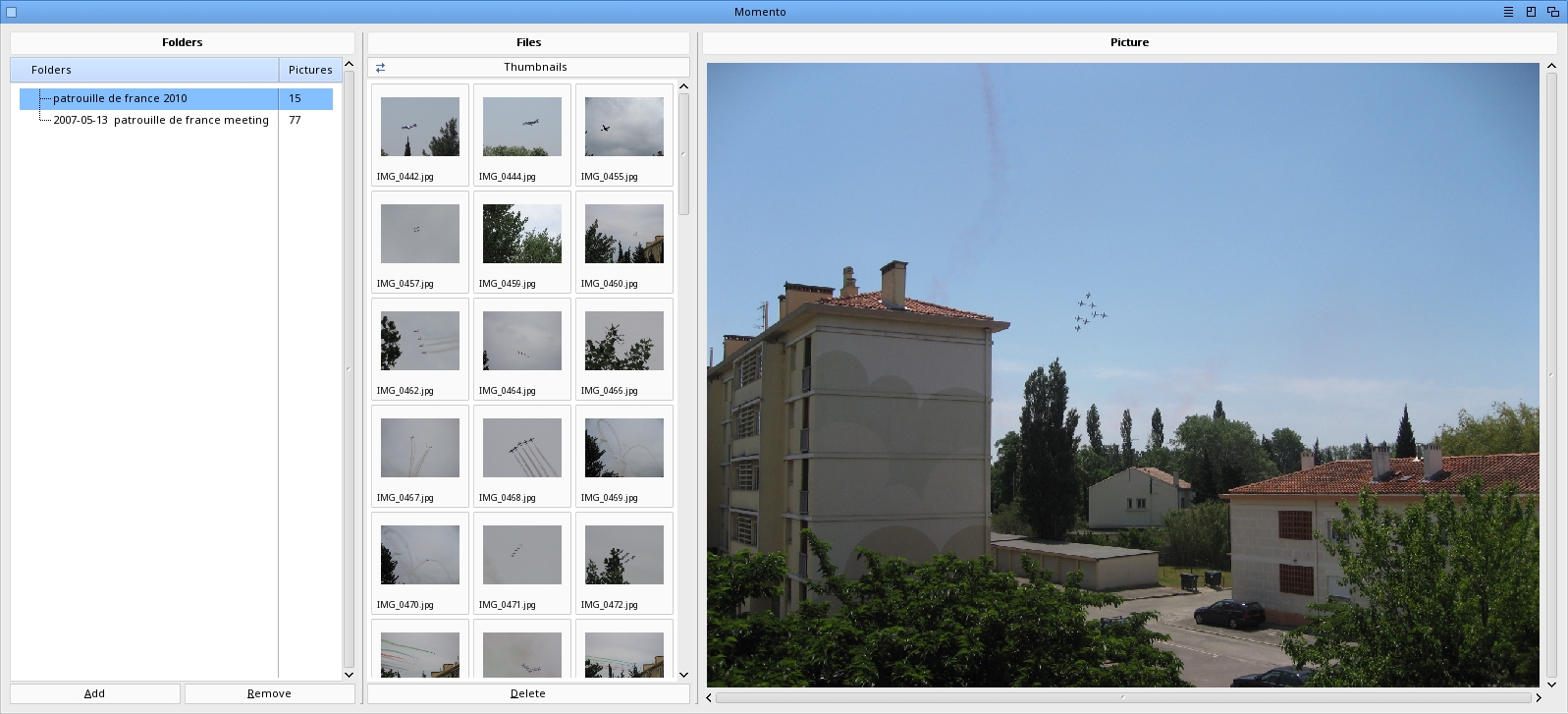
Momento is an image manager and viewer for MorphOS with a modern MUI
interface. It features a three-panel layout: folder tree, file list,
and image preview.
FEATURES
========
* Three-panel MUI interface (folders / files / preview) with two
independent resize bars between panels
* Folder tree with recursive subdirectory scanning
* Switchable view modes: multi-column list or thumbnail grid
* Asynchronous thumbnail generation — GUI stays responsive even
on folders with hundreds of large DSLR images
* Multi-column sortable file list (name, size, date)
* Image preview with automatic scaling and fast scaled JPEG decode
* JPG, PNG, native BMP, GIF, IFF/ILBM, TIFF, TGA, PCX, WebP
* Robust to malformed files: PNG with .jpg extension, corrupt JPEG,
exotic IFF, broken BMP — none can crash or freeze Momento
* Drag & drop folders and images from Ambient
* Drag & drop images between folders in the tree
* Previous/Next image navigation
* Delete files with confirmation
* Persistent folder list and view mode (PROGDIR:Momento.prefs),
saved automatically on quit and on demand from the Settings menu
REQUIREMENTS
============
* MorphOS 3.19+
INSTALLATION
============
Extract the Momento archive to your preferred location
USAGE
=====
* Add drawers via menu Project > Add Drawer (Cmd+A), the Add button
under the folder tree, or by dragging them from Ambient
* Remove a drawer from the list with the Remove button (only removes
the entry — files on disk are NOT touched)
* Click on a folder in the left panel to list images; the first
image is automatically selected and previewed
* Switch between List and Thumbnails view using the cycle gadget
* Click on a file or thumbnail in the center panel to display preview
* Navigate with Previous (Cmd+P) and Next (Cmd+N)
* Drag images from the file list onto a folder to move them
* Drop folders or images from Ambient onto the window
* Delete selected image with Edit > Delete (Del)
* Click on column headers to sort by name, size, or date
* Save the folder list and view mode with Settings > Save Momento
settings (Cmd+S); they are also saved automatically on quit and
restored on next launch
KEYBOARD SHORTCUTS
==================
Cmd+A Add drawer
Cmd+S Save Momento settings
Cmd+P Previous image
Cmd+N Next image
Suppr Delete selected image
Cmd+? About
Cmd+Q Quit
HISTORY
=======
1.1 (08.04.2026)
- Image type is now detected from file content
- IFF files are validated before being passed to picture.datatype
- Native BMP decoder (1/4/8/24/32-bit BI_RGB)
- Cursor-key navigation in the file list now clears the previously
clicked selection so only the active row stays highlighted
(multi-selection with shift+click is preserved)
- File list date column now falls back to the filesystem modification
date when EXIF DateTime is unavailable, so non-JPEG formats and
EXIF-less JPEGs always show a date
- Window can now be resized larger: the preview widget no longer caps
the window width/height at 4096 pixels
- Three-panel layout reworked with two independent Balance gadgets so
the center column can be resized against either neighbour
- Folder tree no longer shows a "+" expander on drawers without
image-containing subdirectories
- Asynchronous thumbnail loading: the GUI stays fully responsive
while a folder of hundreds of DSLR images is being decoded
(you can scroll, click, switch folders or quit at any time)
- Thumbnail grid uses a stable Columns layout so the window no
longer shrinks or jumps when switching between folders of
different sizes
- First image of a directory is now auto-selected on folder open
- Thumbnail click handler only updates cells whose selection state
actually changes (was iterating all cells — laggy on big folders)
- JPEG previews are decoded at a resolution close to the display
panel
- Folder list is persisted to PROGDIR:Momento.prefs (one path per
line, plus key=value options) and restored on next launch
- View mode (list / thumbnails) is also saved in the preferences
- Settings > Save Momento settings (Cmd+S) for manual save; the
preferences are also saved automatically on quit
- New Remove button next to Add removes the selected drawer from
the list (does NOT delete files on disk); selecting any
subdirectory removes the root that owns it
1.0 (06.04.2026)
- Initial release
COPYRIGHT
=========
Momento is Donationware. It is freely usable and distributable.
If you enjoy it, a donation is welcome to support future features.
Momento is (c) 2025-2026 Yannick Buchy. All rights reserved.
CONTACT
=======
Bug reports and suggestions are welcome to papiosaur2@hotmail.fr
THANKS
======
MorphOS Team for MorphOS
CptBlood, Poly and Sprocki for suggestions and reports bugs
CptBlood and Gabriel Sokol for their support for this project
|


 Ambient (149)

 Momento_1.1.lha