| Readme: | CRYPTOMOS 0.8 - Encryption and archiving tool for MorphOS
DESCRIPTION
CryptoMOS is a native MorphOS tool allowing you
to encrypt and archive your files and directories into
a secure proprietary format (.cmos).
It supports multiple encryption and key derivation
algorithms to suit your security needs.
REQUIREMENTS
- MorphOS 3.19 minimum
- 64MB de RAM minimum (128 MB recommanded
for Argon2id)
- MUI 5
INSTALLATION
Simply copy CryptoMOS file and images directory
to directory of your choice and run it.
USAGE
ENCRYPTION
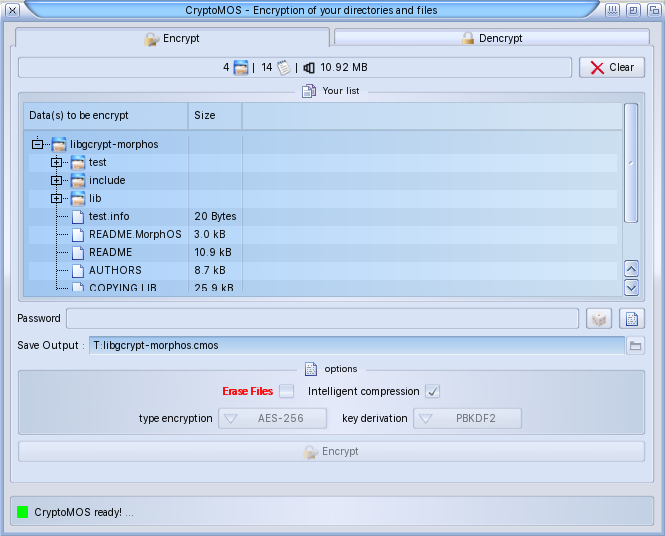
- Drag&drop your files and directories into the
"Encryption" tab of the main window.
- Use the built-in generator to easily and
securely create a 20-character.
- Use the "copy" button (clipboard function)
to save your password wherever you want.
- Choose a volume/directory where you want
to save your future .cmos file.
- Choose your encryption algorithm and key
derivation.
- Click to "Encrypt" button for create .cmos
archive.
DENCRYPTION
- Drag&drop your .cmos file into the
"Dencryption" tab of the main window.
- Enter your password in the "Password"
field.
- Choose a volume/directory where you
want to dencrypt your .cmos file.
- Click to "Dencrypt" to start the complete
dencryption of your .cmos file.
ALGORITHMS
- AES-256-CBC + PBKDF2
- AES-256-CBC + Argon2id
- ChaCha20 + PBKDF2
- ChaCha20 + Argon2id
Note: The Argon2id algorithm uses 32 MB
of RAM and 3 passes for key derivation,
providing an excellent level of security
while remaining compatible with
standard MorphOS configurations.
FORMAT .CMOS
The .cmos format is a proprietary format
including 68-byte header containing encryption
information, followed by compressed and
encrypted data, and a file tree index.
AUTHOR
digitallytechno
email : digitallytechno@proton.me
web: digitallytechno.netlify.app
LICENCE
Freeware - Free distribution allowed
|


 Ambient (150)
 CryptoMOS_0.8.lha