| Readme: | Short: Run apps from the screenbar
Kurz: Apps von der Screenbar aus starten
Author: Thomas Igracki
Uploader: Thomas@Igracki.de
Version: 3.0
Type: util/wb
Architecture: ppc-morphos
Did you ever dream of starting any application from any (public) screen without
needing to switch back to the Ambient screen to run it or remember its hotkey?
Now you can!
This screenbar module opens a popup menu if you click on the AppLauncher icon
in your screenbar, so you can select the application you want to start!
Better yet, you are able to configure the menu by editing a simple text file
that is located in SYS:Data/Screenbar/AppLauncher/config.
Easier still is to use the in-built menu editor to edit the menu from a nice
MUI GUI!
The default config has all standard MorphOS Applications, Games, Utilities and
Tools!
With a hotkey to open the menu via keyboard, default - ctrl help (User editable)
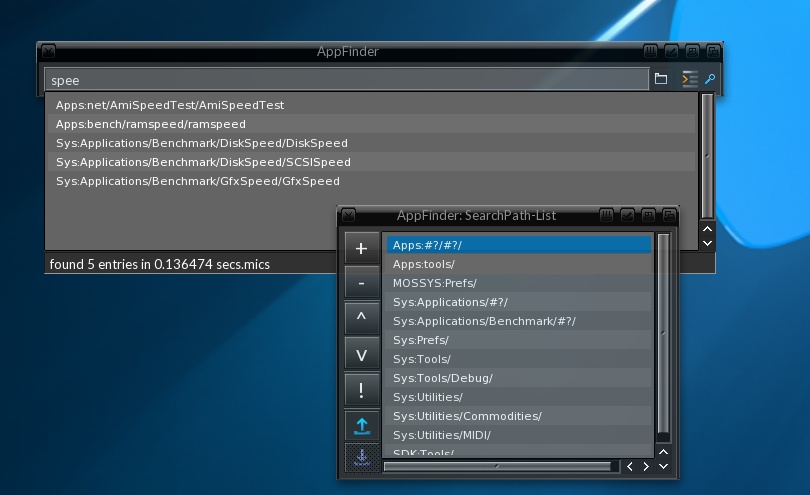
There is also an integrated AppFinder to do a live search for Apps!
Choose "AppFinder..." from menu or press "ctrl insert" (User editable)
INSTALLATION:
=============
Just copy the contents from the "SYS" folder to your SYS: partition manually,
or execute/double-click the "Install" file to do this.
Your custom config file won't be overwritten anymore!
Then via a right-click on the top-right screen depth-gadget, select
Modules>Rescan or reboot.
HISTORY:
========
02-Jun-2026, v3.0
chg: The StandardConfig is written for MorphOS v3.20
fix: Removed the AppFinder gadget in the MenuEditor
01-Apr-2026
fix: Custom command execution now opens an output shell window, if necessary
new: Added Shift-Return in AppFinder string gadget to toggle the "No ConfirmReq" option
for the next execution
29-M?r-2026
chg: Also close the window after you open a lister with the drawer of the current list entry
chg: The OpenDrawer button is now in the same group as the string-gadget
fix: The checkmarks of the "Extra menuitems" in the sbar prefs weren't left aligned
chg: made changes to StandardConfig for MorphOS v3.20
23-M?r-2026
new: Added the ExeCheck to only add executables (MOS, ELF, 68k) into the list
new: Added a button next to the status field to open a lister with the drawer of the current list entry
chg: Changed "Open" to "Run" in the ConfirmRequester
15-M?r-2026
fix: If you use AppFinder before you opened the menu, the cmds weren't added to the Recent-Menu
12-M?r-2026
fix: If "No Confirm Requester" is active, the commands weren't added to the Recent-Menu
01-M?r-2026
chg: "AppFinder/No Confirm Requester" is now TRUE by default
new: added a "Custom..." entry to the ConfirmRequester f.e. to add additional args to the command
rem: removed some debug output
new: add cmds started from AppFinder to the Recent-Menu
17-Feb-2026: v3.0 beta
new: Added an AppFinder! Press ctrl-insert to try it out! The hotkey can of course be customized.
24-Nov-2025
new: Added Benchmark/SCSISpeed
16-Nov-2025:
chg: splitted the text in the About group in settings into 3 lines so the window can be sized smaller
23-Okt-2025: v2.7
fix: a Mungwall hit after choosing a command from asl-requester
fix: only replace the filename in command if you f.e. start the app with WBRun
13-Feb-2025:
chg: made changes to StandardConfig for MorphOS v3.19
15-Feb-2024: v2.6
chg: made changes to StandardConfig for MorphOS v3.18
08-Feb-2022: v2.6beta
chg: create the InputHandler in MUIM_Setup not OM_NEW, so it won't be created
if the sbar is installed but not used
[thanks jaca for mention it]
fix: don't try to open the popupMenu via hotkey (ctrl-help) if its aleady open
17-Mai-2020: v2.5
chg: recompiled with ggc9
new: added a "Current Dir:" prefs item to the "Launch Parameters"
so launched commands have a current dir, before its was undefined
fix: the "Usage:" line in the written config file wasn't correct (BAR and END are /S not /K)
02-Feb-2019: v2.4
new: added "Launch parameters" in the settings, there you can define the con-window for output,
the stacksize and the priority of the launched programs
new: the search-path for the launched programs is now cloned from workbench,
previously it was only c: and current directory
02-Dez-2018:
chg: the user had to first click inside the MenuEditor's listview to add an item, because it was disabled, if
no entry was selected
26-Nov-2018:
chg: changed the "Open menu hotkey:" label to just "Open menu:", because the group title already contains "Hotkey:"
new: added a "Donate money" link to the prefs page
31-Oct-2018: v2.3
new: added a new interactive installation/update script
chg: now the standard config file is named "StandardConfig", which will be loaded
if no file named "Config" was found, this was done to not overwrite your custom config
when updating to a new version
chg: addded the Games folder to the standard config
new: if you add a new item, and then select the command from the popup file requester,
the Name field is automatically set to the filename
26-Oct-2018:
new: added two checkmarks in the settings for not adding the "Recent Apps" and "MenuEditor..."
menuitems
[25-Oct-18, suggested by Christoph Poelzl]
20-Oct-2018: v2.2
fix: the wrong image (11 instead of 14) was taken for the sbar image
new: there is now a hotkey to open the menu via keyboard (default is ctrl help)
fix: adding an item to the root then saving the config, leads to an endless loop adding lots of spaces
to the config file
[16-Oct-18, reported by sprocki]
15-Oct-2018:
fix: renaming an menu entry shows random text in the command column
chg: now a new item has "SYS:NewCommand" as its initial command instead of "<New command>" to have an
initial drawer in the file requester
12-Oct-2018: v2.1
fix: The sbar image is now re-coloured using the screenbar's TextPen instead of using a negative of the image
[10-Oct-18, reported by emeck]
fix: Fixed a hit if you open the MenuEditor for the first time
[08-Oct-18, reported by jPV]
09-Oct-2018:
fix: The "Do you really want to save" req, always opened on the Ambient screen, no matter on which
screen you opened the MenuEditor
[09-Oct-18, reported by NewSense]
chg: The requester now appears in the center of the MenuEditor window
chg: If the MenuEditor window is open and you select the menuitem again, it will be closed, but
if you opened it on a different screen, it will be reopened on the current screen
08-Oct-2018: v2.0
- added a full blown menu editor to edit the menu including drag and drop support to add apps!
28-Sep-2018:
- new screenbar image by Andr? Siegel
- the screenbar image is now automatically converted to negative, if the background is dark
24-Sep-2018: v1.1
added a "Recent Apps" menu, with the last 10 launched apps
20-Sep-2018: v1.0
first version
WEB
===
Please visit http://www.igracki.de to checkout my other software and/or
make a donation
THANKS TO
=========
- Neil Pearson for proof-reading
- jPV for disclaimer text;)
DISCLAIMER
==========
This software is made available to you as Freeware and you may use this
software in whatever way you wish, but the author accepts no liability for
any damage caused to your system or other connected peripherals by using
this software.
|


 Ambient (150)
 AppLauncher_3.0.lha