| Readme: | Short: Driverless IPP/AirPrint printing for MorphOS
Author: Yannick Buchy
Type: driver/print
Version: 1.1
Architecture: ppc-morphos
Requires: MorphOS 3.20 + an IPP/AirPrint printer
IPP-Print 1.1 - Driverless IPP/AirPrint printing for MorphOS
============================================================
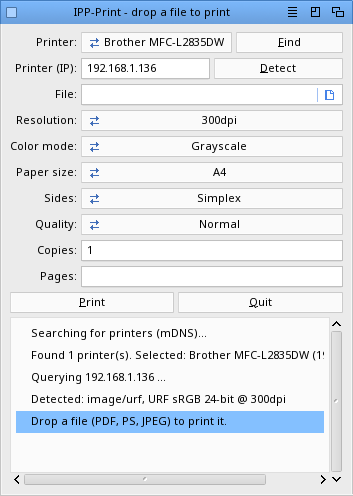
IPP-Print is a small native MorphOS (MUI) tool that prints a file to a
network printer using IPP / AirPrint directly ("driverless" printing).
Drop a file on the window, pick the printer, press Print.
TECHNOLOGIES
------------
Provided by MorphOS:
- Ghostscript (PDF/PostScript -> CUPS raster)
Implemented by IPP-Print:
- IPP / AirPrint driverless printing
- mDNS / Bonjour printer discovery
- URF / PWG-Raster (image/urf)
REGISTRATION
------------
Printing is reserved for registered users: IPP-Print checks your MorphOS
registered name. IPP-Print has its OWN registration, independent from Stylos
(you can be registered for IPP-Print, for Stylos, or for both). In the
unregistered version the Print button reports that printing is for registered
users.
Pricing:
IPP-Print alone: 15 euros
Stylos + IPP-Print (word processor bundle): 49 euros
(Stylos is a native MorphOS word processor by the same author; the bundle
includes its registered version with RTF/PDF export and printing.)
To get the full (registered) version, support the project:
PayPal : papiosaur2@hotmail.fr (send as a friend to avoid fees)
After your payment, send an email to yannick.buchy@gmail.com with your
PayPal name and you will receive a registered build.
FEATURES
--------
- Drag & drop: drop a PDF, PostScript or JPEG file on the window
- Automatic printer discovery via mDNS / Bonjour (_ipp._tcp.local)
- Automatic detection of the printer capabilities (format, resolution,
colour mode, paper size, duplex...) - nothing to configure by hand
- Driverless printing over IPP, sending Apple Raster (URF) - the format
used by AirPrint printers
- Supported input: PDF and PostScript (rendered via Ghostscript), and
JPEG (sent directly to the printer when it advertises image/jpeg)
- Print options: resolution, colour / grayscale, paper size (A4, Letter,
Legal, A5), sides (simplex, duplex long edge, duplex short edge),
quality, number of copies, page range
- Correct paper size via IPP media-col (no more wrong "Executive" guess)
- Correct duplex long-edge / short-edge (back-side rotation handled)
- Multi-page friendly: pages are streamed one at a time (low memory use)
- Real "job finished" feedback (the printer is polled until completion)
- Manual IP entry (press Enter), for printers not found by mDNS
- Single log file for easy troubleshooting
INSTALLATION
------------
Simply copy the IPP-Print drawer to your preferred location.
USAGE
-----
1. At launch, IPP-Print searches for printers (mDNS), selects the first one
and detects its capabilities. Press "Find" to scan again, or type the
printer IP and press Enter.
2. Drop a file on the window (or choose one with the file button). The file
path is filled in - it does NOT print yet, so you can pick the printer.
3. Set the options (resolution, colour, paper, sides, quality, copies,
pages), then press "Print".
Tip: dropping a file only fills the file field; printing is always started
by the Print button, so you stay in control of which printer is used.
LOG
---
A single log file is written next to the program: PROGDIR:IPP-Print.log
It records everything (printer detection and full capabilities, the exact
gs command, the IPP request sent, the printer's response, the job-id and
the final job state). This is the file to look at - and to send - if
anything goes wrong.
NOTES
-----
- PNG is not supported (most printers do not advertise image/png).
- Tested with Brother and Canon (TS5150, MB5100) printers.
HISTORY
-------
Version 1.1 (09.06.2026)
- Correct paper size via IPP media-col (no more wrong "Executive")
- Correct long-edge vs short-edge duplex
- The printer is polled until the job has really finished
- Large multi-page jobs now use far less memory
- Printer chooser is a pop-up list (the window no longer resizes)
- Last printer is restored at next launch without re-scanning
- During a scan everything is greyed except Quit; Print waits for a printer
- Manual detection by pressing Enter in the IP field (Detect button removed)
- Shared IPP detection engine with Stylos
- More reliable detection (handles printers that split their reply)
- Grayscale now really prints in grayscale
- Older Canon printers found via the alternate IPP path
- Fully translated interface and messages (15 languages)
Version 1.0 (09.06.2026)
- First release: drag & drop a PDF/PS/JPEG to print over IPP / AirPrint
- mDNS printer discovery and automatic capability detection
COPYRIGHT
---------
Copyright (c) 2026 Yannick Buchy
IPP-Print is provided as-is without warranty.
The IPP/raster engine is derived from the UniPrint work and is also used by
the Stylos word processor.
THANKS
------
CptBlood for his numerous print tests on real hardware.
CONTACT
-------
yannick.buchy@gmail.com
|


 Ambient (150)
 IPP-Print_1.1.lha