| Readme: | Short: Driverless eSCL/AirScan network scanning for AmigaOS/MorphOS/AROS
Author: Tomasz Paul
Type: driver/misc
Version: 0.73
Architecture: ppc-morphos
Requires: MorphOS an eSCL/AirScan network scanner
airScanner 0.73 - Driverless eSCL/AirScan network scanning
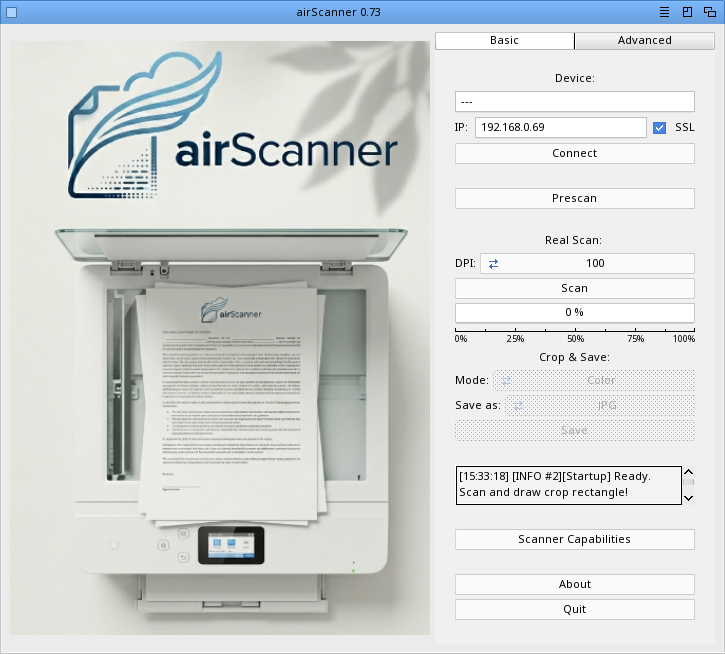
airScanner is a tool that allows you to scan documents from a network
scanner using the eSCL / AirScan protocol directly ("driverless" scanning).
Connect to your scanner, perform a prescan to adjust the crop area,
and scan your documents directly to your computer.
FEATURES
eSCL / AirScan driverless scanning (HTTP + XML)
Automatic detection of scanner capabilities (Make, Model, DPI, Scan Area)
Adjustable scan settings:
Brightness, Contrast, Sharpen, Threshold (for B&W mode)
Compression factor
Source selection: Platen (Flatbed) or ADF (Automatic Document Feeder)
Colour modes: RGB24, Grayscale8, Black & White 1-bit
Live Preview & Interactive Cropping:
Draw your crop rectangle directly on the prescan image
Save specific regions as JPEG or PDF
Advanced Workflow:
Multi-page PDF support (ADF or manual Platen mode)
Real-time status logging (debug log to T:airscanner.debuglog)
SSL support for secure scanner communication
Preferences management (saved automatically to airScanner.prefs)
INSTALLATION
Ensure you have the required Hollywood plugins (RapaGUI, hURL, pdf-lite) installed.
Simply extract the archive to your preferred location.
USAGE
Launch airScanner.
Enter the IP address of your network scanner and select the protocol (HTTP/HTTPS).
Press "Connect" to fetch and verify the scanner's capabilities.
Use "Prescan" to get a low-resolution overview of the document.
Draw a rectangle on the preview image to select the area you wish to scan.
Choose your preferred format (PDF/JPG) and scan mode (Color/Grayscale/B&W).
Press "Scan" (Basic tab) or the Advanced Scan button for specialized jobs.
LOGGING
airScanner provides detailed feedback in the internal status window and writes
a debug log to T:airscanner.debuglog. This file is essential for
troubleshooting network issues or communication errors with the scanner.
NOTES
Advanced Scan (Multi-page): When "Multi-page" is enabled in the Advanced tab,
you can process multiple documents via ADF or perform manual multi-page
scans on the flatbed by selecting "Scan next" when prompted.
Conflict Resolution: Some scanners do not support specific combinations
(e.g., JPEG does not support 1-bit Black & White). If a conflict occurs,
the app will alert you to change the format or mode.
Preferences: The app stores device-specific settings in airScanner.prefs
in the application directory to speed up future startups.
COPYRIGHT
2026 Tomasz Paul
airScanner is provided as-is without warranty.
Built with Hollywood and RapaGUI.
CONTACT
www.amiga.icu
THANKS
The Hollywood development team for the excellent platform.
|


 Ambient (150)
 airScanner_0.73.lha