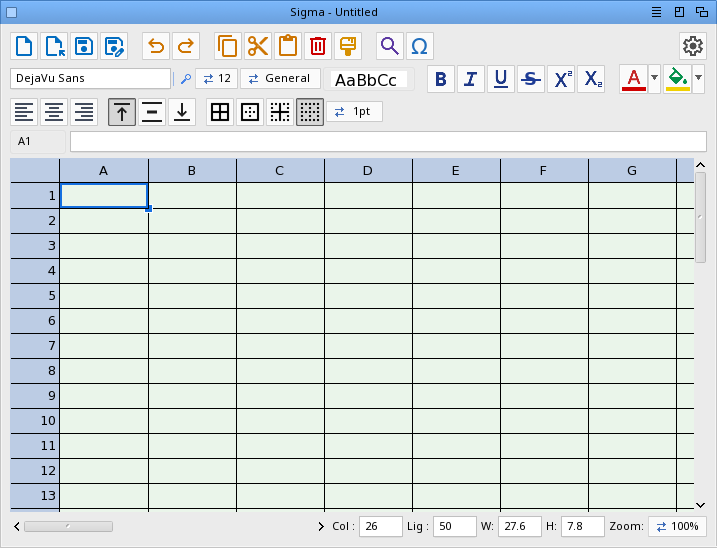
| Readme: | Short: Sigma Demo - a spreadsheet for MorphOS
Author: Yannick Buchy
Type: biz/spread
Version: 1.0
Architecture: ppc-morphos
Requires: MorphOS 3.20+
============================================================================
SIGMA - Spreadsheet
Version 1.0
============================================================================
INTRODUCTION
------------
Sigma is a spreadsheet for MorphOS built with MUI (Magic User Interface) and
TTEngine for TrueType font rendering. It offers live formulas, rich cell
formatting and native OpenDocument (.ods) import/export, with full UTF-8
Unicode support throughout.
TECHNOLOGIES
------------
Provided by MorphOS:
- TTEngine (TrueType font rendering)
- xadmaster.library (ZIP container reading, for ODS import)
Implemented by Sigma:
- A formula engine (cell references, ranges, the usual functions)
- A sparse cell model (millions of logical cells, RAM tracks only used ones)
- OpenDocument Spreadsheet (.ods) reader/writer
- CSV (RFC-4180) import/export
INSTALLATION
------------
Simply copy the Sigma drawer to your preferred location.
Fonts are scanned automatically; no configuration required.
REGISTRATION & UPGRADES
-----------------------
Sigma 1.0 Demo
The demo version lets you try every feature. Saving your work (ODS or CSV)
requires the registered version; opening, editing and importing are free.
The title bar shows "Sigma Demo" until the program is registered.
Registered version:
Sigma (version 1.0 and future updates): 29.90 euros
Sigma + Stylos + IPP-Print + IPP-Scan (full bundle): 69.90 euros
All future Sigma features are included free of charge, among them:
- XLSX (Excel) import and export
- PDF export and printing
- More spreadsheet functions (lookup, dates, text, statistics)
- Frozen panes and multiple sheets
Stylos is a WYSIWYG word processor for MorphOS; IPP-Print/IPP-Scan add
driverless printing and scanning. Each has its own registration.
PayPal: papiosaur2@hotmail.fr (send as a friend to avoid fees)
Contact: yannick.buchy@gmail.com to receive your registered version.
If you have any questions, don't hesitate to ask.
BUG HUNTERS WANTED
------------------
Help improve Sigma! Send a clear bug report with steps to reproduce to
yannick.buchy@gmail.com (the .ods/.csv file and a snapshot are welcome).
Each confirmed bug earns you a 5 euros discount on your license.
Find 6 confirmed bugs and you get Sigma for free, including all updates.
FEATURES
--------
Spreadsheet
- Grid up to 16384 rows x 256 columns (sparse: memory tracks only used cells)
- Keyboard navigation, scrolling, zoom 50%-300%
- Adjustable visible extent (Col/Lig fields)
- Column width / row height in millimetres (W/H fields, keyboard + wheel),
with true 1:1 physical sizing from the screen DPI
Formulas
- = + - * / and parentheses, A1 cell references, A1:B2 ranges
- SUM, AVERAGE (AVG), MIN, MAX, COUNT, PRODUCT
- IF, comparisons (< > = <= >= <>), ABS, INT, ROUND, MOD, POWER (POW),
SQRT, AND, OR, NOT
- Case-insensitive (=sum(b2:b5) works), #CYCLE / #ERR detection
- Point mode: while typing a formula, click or drag cells to insert their
reference; drag a range handle to resize an existing reference
Editing
- Inline editing with a blinking caret, in-cell text selection
- Cell and text clipboard (Ctrl+C / Ctrl+X / Ctrl+V)
- Undo / redo (Ctrl+Z / Ctrl+Y)
- Insert / delete rows and columns (references auto-adjust)
- Find / Replace
- Recent files menu
Formatting
- Bold, italic, underline (+ double), strikethrough (+ double), super/subscript
- Text and cell background colours (palette + colour picker)
- Per-cell font and size
- Horizontal and vertical alignment
- Cell borders, format painter
- Six number formats: 0.00, integer, thousands, percent, currency (EUR),
scientific
- Unicode symbol band for inserting special characters
File formats
- OpenDocument Spreadsheet (.ods) import and export: data, live formulas,
fonts, colours, alignment, borders, number formats, column widths and row
heights - a faithful round-trip, and interoperable with LibreOffice/Excel
- CSV (RFC-4180, UTF-8) import and export
- Drag & drop a file icon onto the window to open it
Interface
- Localized (English by default, French catalog included)
- Preferences (Display): detected monitor and resolution, screen diagonal ->
computed DPI, cell background theme, header colour, cursor width and colour;
saved to ENV:/ENVARC:
- Title bar shows the file name and an asterisk when there are unsaved changes
FILE FORMATS
------------
.ods OpenDocument Spreadsheet - the recommended format, keeps everything
.csv Comma-Separated Values - data only (no formulas, no formatting)
Formulas are stored in OpenDocument (OpenFormula) form on export and converted
back on import, so they stay live and editable in other office suites.
KEYBOARD SHORTCUTS
------------------
Cmd + N New
Cmd + O Open
Cmd + S Save as
Cmd + Z Undo
Cmd + Y Redo
Cmd + X Cut
Cmd + C Copy
Cmd + V Paste
Cmd + ? About
Cmd + Q Quit
Arrow keys Move the active cell
Shift + Arrows Extend the selection
Enter / type Edit the cell ; Enter validates and moves down
F2 Edit the active cell
Mouse wheel Scroll ; Ctrl + wheel zooms
HISTORY
-------
1.0 First public release.
Grid, formulas (with point mode), CSV and ODS import/export, full cell
formatting, number formats, find/replace, undo/redo, preferences with
EDID-based DPI, recent files, localization.
COPYRIGHT
---------
Sigma is Copyright (c) Yannick Buchy. All rights reserved.
DISCLAIMER
----------
Sigma is provided "as is", without warranty of any kind, express or implied.
You use it at your own risk: the author cannot be held responsible for any
data loss or damage resulting from its use. Always keep backups of important
files.
CONTACT
-------
Author: Yannick Buchy
THANKS
------
- MorphOS Team for MorphOS
|


 Ambient (150)
 Sigma_1.0.lha