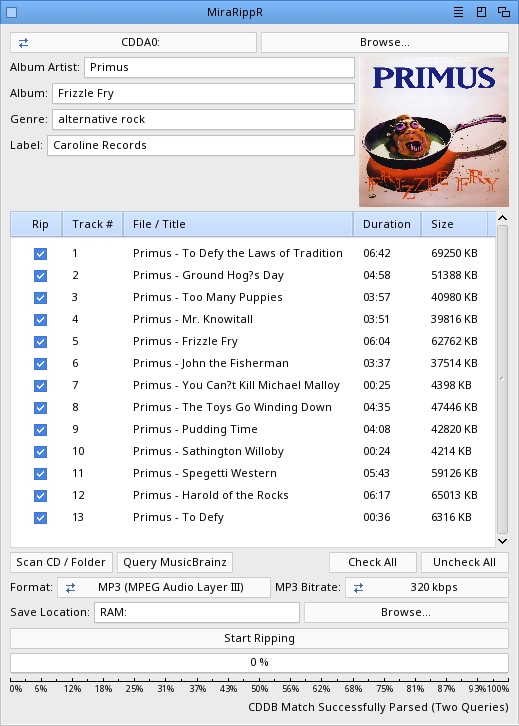
| Readme: | MiraRippR
Version: 1.2
Platform: MorphOS
Author: Skateman using Google`s Gemini Notebook (Former NotebookLM)
Copyright: 2026
Overview:
MiraRippR is a powerful, system-friendly Audio CD Ripper and encoder designed
specifically for MorphOS. Built using the Hollywood multimedia application layer
and RapaGUI, it provides an intuitive graphical interface to seamlessly extract
audio tracks, fetch rich metadata from the web, and encode your music into
high-quality, fully tagged media files.
Key Features:
Automated Metadata Tagging: Integrates with the MusicBrainz API to automatically
fetch Album, Album Artist, Track Titles, Genre, and Record Label data.
Compilation Support: Accurately recognizes and tags single artists in
compilation albums (e.g., "Various Artists" collections) using track-specific
<artist-credit> data.
Cover Art Embedding: Automatically downloads CD jacket covers from the Cover Art
Archive and directly embeds the images into your finished audio files.
Lossless & Lossy Encoding: Rip to Free Lossless Audio Codec (FLAC) for perfect
archival quality, or MP3 (MPEG Audio Layer III) with customizable bitrates
(320k, 192k, 128k, 64k) for portable use.
MorphOS Optimized: Specially engineered to bypass MorphOS command-line string
parsing limitations. All ID3v2.3 tags are securely wrapped to prevent the system
from improperly splitting strings.
Auto-Organization: Automatically creates neat Artist - Album folders and saves
your freshly ripped tracks (alongside a backup cover.jpg) inside.
System Requirements
Operating System: MorphOS 3.20 (3.19 not tested)
Engine: Hollywood 11.0+
Hollywood Plugins Required:
RapaGUI (for the native Magic User Interface / MUI)
hurl (for secure HTTPS requests to the MusicBrainz and Cover Art Archive APIs)
External Tools: A compatible MorphOS port of ffmpeg compiled with libmp3lame
support.
Installation & Initial Setup
Extract the MiraRippR application to your desired directory.
Launch MiraRippR.
From the top menu bar, navigate to Settings > Set FFmpeg Location... and locate
your ffmpeg executable. (Note: You only need to do this once; your configuration
will be permanently saved to MiraRippR.cfg in the application folder).
Quickstart Guide
Follow these simple steps to easily rip your audio:
Select Drive: Choose your CD drive from the dropdown menu (e.g., CDDA0:) or
click Browse... to select a local folder containing uncompressed audio files.
Scan: Click Scan CD / Folder to read the disc's Table of Contents (TOC) and
populate the track list.
Fetch Metadata: Click Query MusicBrainz to automatically query the web for your
CD's metadata and cover art.
Select Tracks: Make sure the "Rip" column is checked for tracks you wish to
save. You can manually edit track titles by slowly double-clicking them in the
listview.
Configure Output: Choose your format (FLAC or MP3). If you select MP3, customize
the bitrate. Use the Browse... button to select your base save location (e.g.,
Work:Music).
Rip: Click Start Ripping. Tracks and cover art will be automatically organized,
encoded, and perfectly tagged in your output folder!
Technical Notes
Temporary RAM Caching: During the ripping process, MiraRippR securely utilizes
your RAM: drive for temporary caching (such as TOC generation files, XML API
responses, and intermediate WAV extraction) to preserve hard drive health and
increase speed. These files are automatically cleaned up when the job finishes.
File Processing: MiraRippR extracts uncompressed data asynchronously. Once
extraction reaches 50%, it dynamically hands the file over to ffmpeg to handle
the heavy lifting of encoding and ID3 tagging (50% to 100%).
|


 Ambient (150)
 MiraRippR_1.22.lha