| Readme: | Short: Driverless printing and scanning (shareware)
Author: Yannick Buchy
Type: driver/misc
Version: 1.0
Architecture: ppc-morphos
Requires: MorphOS 3.20 + an IPP/AirPrint printer or an eSCL/AirScan scanner
Replaces: IPP-Print & IPP-Scan
IPP-Office 1.0 - Driverless printing and scanning for MorphOS
=============================================================
IPP-Office puts IPP-Print and IPP-Scan in one program. A cycle at the
top of the window switches between them: printing on one side, scanning
on the other. The window stays; only the page changes.
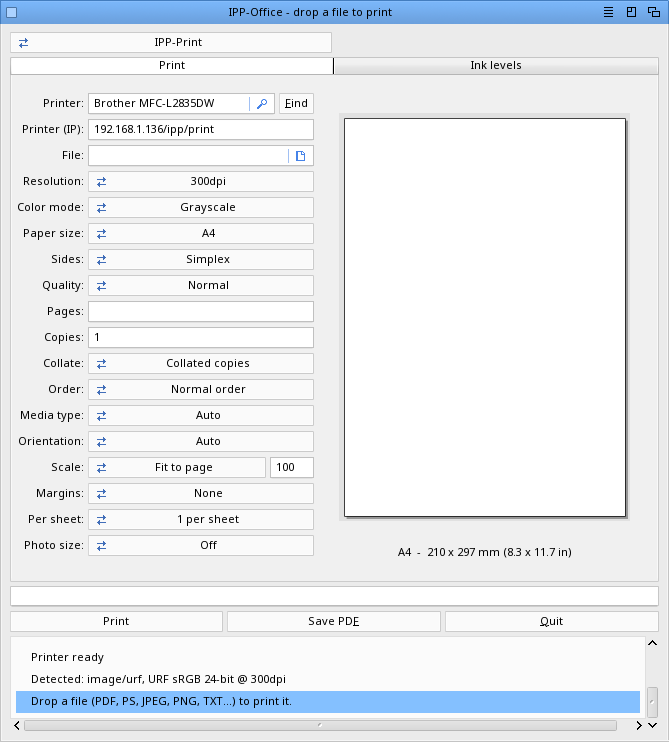
Printing is shown first.
And because the two halves now live together, they do two things
neither could do alone: one search finds the printer AND the scanner,
and a scanned page can go straight to the printer.
Nothing was rewritten. Each half keeps its own interface, its own
preferences file and its own translations -- the two programs you
already know, under one roof.
WHAT IS IN IT
-------------
Printing (IPP-Print 1.5)
- Drop a file on the window, pick the printer, press Print
- IPP / AirPrint driverless printing, URF / PWG-Raster
- Live preview, N-up, scaling, page ranges, save as PDF
- What you can drop on it:
PDF, PS, EPS through Ghostscript
JPEG, PNG, GIF, BMP, TIFF, IFF/ILBM
plain text .txt, and files with no extension that
turn out to be text (ReadMe, .guide...)
PDF and PostScript are recognised by their content as well as by
their name, so a file called otherwise still prints.
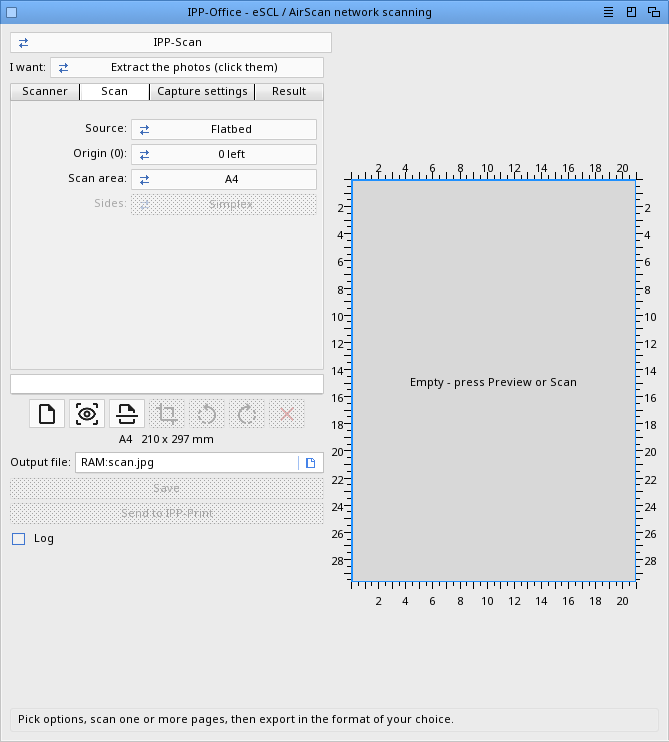
Scanning (IPP-Scan 1.8)
- eSCL / AirScan network scanning, platen or feeder
- Preview, crop, multi-page accumulation
- OCR to searchable PDF or text, with Tesseract
Copying
- The Copy button on the scanning page writes the scanned pages to a
temporary PDF and hands it to the printing page, which opens with the
file loaded. One click on Print and the page comes out.
- It does not print by itself: you see the preview, the paper and the
settings first. A scan put in crooked would otherwise cost a sheet.
Finding the device
- A multifunction announces itself twice on the network -- once for
printing, once for scanning -- from the same address. Both questions
are now asked in one four-second listen, and both lists fill in.
Whichever Find you press, the machine is found once, not twice.
TECHNOLOGIES
------------
Provided by MorphOS:
- Ghostscript (CUPS raster, preview and OCR rendering)
Bundled with this archive:
- Tesseract 5.5.1 OCR engine (Apache License 2.0)
- Leptonica 1.85.0 (BSD 2-clause)
Their licence texts are in the Licenses drawer.
Implemented by IPP-Office:
- IPP / AirPrint driverless printing, URF / PWG-Raster
- eSCL / AirScan driverless scanning
- mDNS / Bonjour device discovery
REGISTRATION
------------
The demo version lets you try everything. Printing, and saving a scan,
require registration.
IPP-Office replaces IPP-Print and IPP-Scan, which it contains. It uses
the SAME registration: if you were registered for either of them, you
are registered here, and there is nothing more to buy. It checks your
MorphOS registered name.
Registered version:
IPP-Office (printing and scanning): 19.90 euros
Stylos + IPP-Office: 49.90 euros
Sigma + Stylos + IPP-Office: 69.90 euros
(Stylos is a native MorphOS word processor by the same author, Sigma a
spreadsheet; the bundles include their registered versions.)
PayPal: papiosaur2@hotmail.fr (send as a friend to avoid fees)
Contact: yannick.buchy@gmail.com to receive your registered version.
If you have any questions, don't hesitate to ask.
INSTALLATION
------------
Extract the archive and double-click IPP-Office. Keep the Catalogs,
Icons, Licenses, tessdata drawers and the tesseract program beside it.
Nothing has to be uninstalled: IPP-Print and IPP-Scan can stay where
they are. IPP-Office reads and writes the same preference files
(IPP-Print.prefs and IPP-Scan.prefs), so a printer or a scanner you had
already chosen is found again -- but in ITS OWN drawer, next to
IPP-Office, not in theirs.
OCR
---
OCR needs the tesseract program and its language data. Both come with
this archive: tesseract in the IPP-Office drawer, the languages in
tessdata beside it. English and French are provided; add a language by
dropping its <code>.traineddata file into tessdata.
HISTORY
-------
Version 1.0 (10.08.2026)
- First release. IPP-Print 1.5 and IPP-Scan 1.8 in one program, chosen
by a cycle at the top of the window. The window stays; only the page
changes.
- Copy: the scanned pages go to the printer without passing through a
file you have to find again.
- One search finds both. Press Find on either side and the printers
and the scanners are both listed.
- Choosing a device on one side chooses it on the other, when the same
machine prints and scans.
- A printer or scanner in deep sleep is no longer missed. It used to
take two searches to find it.
- Opening the Ink levels tab reads the levels again.
- One log for both halves, PROGDIR:IPP-Office.log.
- Scanner detection waits until you open the scanning page. Opening
the program to print no longer waits for a scanner to answer.
LICENCE
-------
IPP-Office is distributed as a demo: everything can
be tried, but printing and saving a scan need a registration, the same
one as IPP-Print's. See REGISTRATION above.
The program itself may be passed on as it comes, whole and unmodified.
Use at your own risk.
Tesseract 5.5.1 (Apache License 2.0) and Leptonica 1.85.0 (BSD
2-clause) are third-party software redistributed with this archive
under their own terms. Their licence texts are in the Licenses drawer
and must travel with it.
CONTACT
-------
Author: Yannick Buchy
|


 Ambient (150)
 IPP-Office_1.0.lha