| Readme: | Short: Native MTProto Telegram chat client
Uploader: michele.dipace@kaffeine.net (Michele Dipace)
Author: Michele Dipace <michele.dipace@kaffeine.net>
Type: comm/tcp
Version: 0.0.92
Replaces: comm/tcp/tgamiga.ppc-morphos.lha
Architecture: ppc-morphos
Requires: MorphOS 3.x with its TCP/IP stack
WHAT IS THIS?
-------------
Telegram Amiga brings real, live Telegram chat to the Amiga -- not through
a gateway, a proxy service or a web wrapper, but by speaking Telegram's
own MTProto protocol natively, from scratch, on your machine. You sign in
to your normal Telegram account, your chat list appears, and you talk to
people (and they talk back) on hardware that may well be older than they
are.
Everything is built in: RSA, Diffie-Hellman, AES, SHA and the SRP two-
factor login are implemented inside the program. Zero external
dependencies -- no MUI, no ixemul.library, no AmiSSL, no TCP helper
beyond your system's own bsdsocket stack.
One program, two faces, one engine and one saved login:
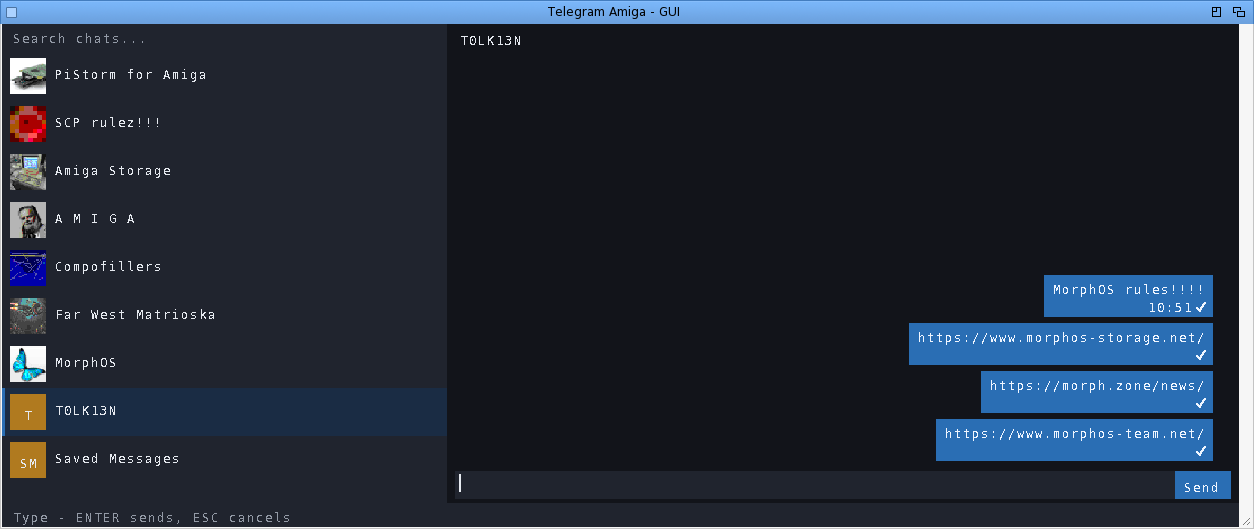
TelegramAmiga - the native Intuition/GadTools GUI: chat list with real
profile-picture avatars, message bubbles, scrollbars,
mouse wheel, context menus. This package ships its icon.
The same binary also runs a full-screen text/console client
from a Shell -- the manual gives the command line.
WHAT CAN I ACTUALLY DO WITH IT?
-------------------------------
Read and send messages in private chats, groups and channels. Download a
received file (right-click -> Download) or send one from disk, up to
250 MiB on this build, including files over 10 MiB.
Photos appear immediately as blurred previews, refine from a bounded download
and reuse decoded pixels from disk when reopened. Click one for a larger
progressive viewer, or disable inline loading on a slower machine and open
only the images you choose. Forward one message to Saved Messages in a
click, or choose another destination through chat search.
Use the pinned Saved Messages chat as a cloud transfer drawer between the
Amiga and your phone or PC. Reply to a specific message (right-click it).
Edit or delete your own messages. See
real delivery state: one tick = sent, two blue ticks = read, updating
live. See who is typing. Search for chats. Send messages from your desk
at work and find the conversation already synced when you get home to
the Amiga -- and the other way round.
Message times follow your Amiga clock. Unread badges and your chat order
survive restarts. The window remembers where you left it, and can open
on its own screen if you prefer a dedicated page for chatting.
GETTING STARTED
---------------
1. Copy this drawer to a WRITABLE volume (not from the archive directly).
2. Double-click TelegramAmiga (or TelegramAmiga-TUI on very low-end setups).
3. First run walks you through the normal Telegram login: phone number,
the code Telegram sends you, and your cloud password if you use
two-factor. That is all -- next time it goes straight to your chats.
The login is stored in telegram-auth.bin next to the program. Treat that
file like a house key: NEVER copy it around or share it -- anyone who has
it has your Telegram session. Full EN and IT manuals are in the archive,
including per-platform notes and troubleshooting.
WHAT IS NEW IN 0.0.92
---------------------
ADDED
- Links get their preview. A pasted link showed as the bare URL, because the
preview the server had already built for it was skipped whole; the bubble
now carries the site and page title on one line and the first line of the
description under it. When the preview comes with a picture, that picture
goes through the same bounded photo pipeline as any other and obeys the same
Inline photos setting. A preview the server is still fetching stays silent
rather than guessing.
- Videos show a frame. A document carries the same thumbnail vector a photo's
sizes come from, so the still goes through the bounded inline pipeline
unchanged: same disk cache, same pacing, same Inline photos setting, and
nothing new to download twice. The clip keeps its length and size beside the
frame, because those are not in the frame. Stickers do not get a picture:
the thumbnail Telegram serves for one is WEBP, which this client has no
decoder for, so it is not fetched at all and the bubble keeps the sticker's
emoji. With inline photos switched off the marker now says what the thing is
rather than "[Photo]", and it still opens the viewer when clicked.
- The transcript says what an attachment is instead of what it is called. A
sticker shows the emoji it stands for, a clip its length and its shape, a
voice note its duration. Music keeps its filename, which is how you know
which track it is, and a plain file is unchanged.
- The login panel says where Telegram sent the code. With another device
signed in the code arrives inside Telegram itself, not by SMS, and a first
user waited for a message that was never coming. The window now says which
it was, and the digit count when the server gives one. The manuals say it
too, on the first-start page.
FIXED
- A bubble no longer holds space open for a picture the client has given up
on. Once every size of an image has been fetched and refused, which is what
an undecodable format looks like from here, the message falls back to its
text instead of showing an empty frame that no later paint will ever fill.
- A downloaded Amiga program comes out runnable. The executable bit is set
from the file's own magic bytes rather than its name, on the completed
download only, and the other protection bits survive. Both loadable families
count: HUNK for classic 68k programs and ELF for AmigaOS 4, MorphOS and AROS
ones, which the first cut had missed. Reported with the polarity warning
that saved a round: on Amiga those bits are active low.
- A long message goes out. The send query was built into a 512 byte buffer, so
anything past roughly 460 characters failed to build and the client quietly
refused to send it. Both send paths now size that buffer from the composer.
Pasting more than the composer holds also used to truncate in silence while
still reporting success; it now says how much landed.
- A symbol with no Latin-1 shape no longer leaves a hole. It renders as
nothing, and the space that introduced it stayed behind, so a line read with
a gap in the middle. The space now leaves with the symbol. Modifiers are
exempt, since they attach to the character before them.
A COMMUNITY PROJECT
-------------------
MIT licensed, non-commercial, written for the love of the platform.
Bug reports and wishes are very welcome -- testers on real hardware
(A1200s, A4000s, Pegasos, Sam, FPGA machines) are what moves this
project forward.
Source + issues:
https://github.com/kaffeine1/telegram-amiga
Development diary:
https://androidlab.it/en/telegram-amiga-mtproto-client-development-diary/
|


 Ambient (151)
 TelegramAmiga_0.0.92.lha