| Readme: | Short: CPU, memory, volume, net & task monitor
Author: Samuel Kielek
Uploader: cygnus amigascne org (Samuel Kielek)
Type: util/moni
Version: 1.0.1
Architecture: m68k-amigaos >= 3.0; ppc-amigaos >= 4.1; ppc-morphos >= 3.0
Distribution: Aminet
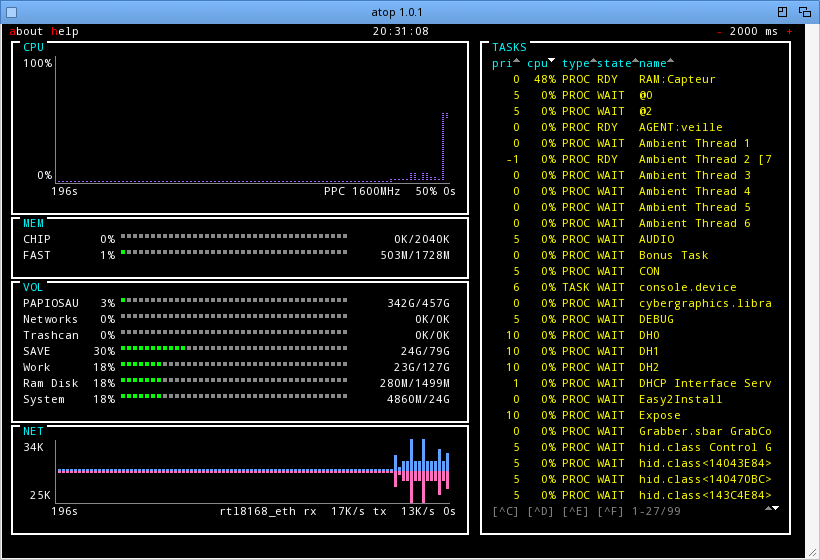
atop is a live system monitor for the Amiga, in the spirit of the Unix
"top". It opens its own window with five panels that refresh on a
timer: CPU load, CHIP/FAST memory, mounted volumes, network throughput
and the task list.
* CPU and network are scrolling plots, memory and volumes are meters
coloured green/amber/red by usage.
* The task list shows each task's command name. Sort it (priority,
type, state, name), filter it by name with '/', and send a selected
task Ctrl-C/D/E/F, with a confirm before ^C.
* Full mouse control, and a key for every action.
* Run it as a see-through desktop widget: a view-only panel on the
Workbench backdrop, placed and styled by icon tooltypes or Shell
arguments.
* Choose which volumes the VOL panel shows (VOLS= / NOVOLS=).
One archive carries three native builds (68k, AmigaOS 4, MorphOS), the
Installer installs the one for your system. atop reads only public
system state, needs no assigns or external libraries, and draws in your
system default font so it matches the desktop.
Requirements:
* 68k: AmigaOS 3.0 or newer, AROS or ApolloOS, on a 68020 or better.
* AmigaOS 4.1 Final Edition.
* MorphOS 3.x.
* Network panel: Roadshow (used automatically), or any other TCP/IP
stack via a named SANA-II device. See atop.doc.
See atop.doc for the keys, the task filter, the icon tooltypes and the
desktop-widget and network settings.
|


 Ambient (150)
 atop_1.0.1.lha