| Readme: | Short: SRecord - screenshots, editor and screen videos, MUI
Author: BeWorld
Type: util/wb
Version: 1.3
Architecture: ppc-morphos
Requires: muimaster.library, z.library, jfif.library, freetype.library
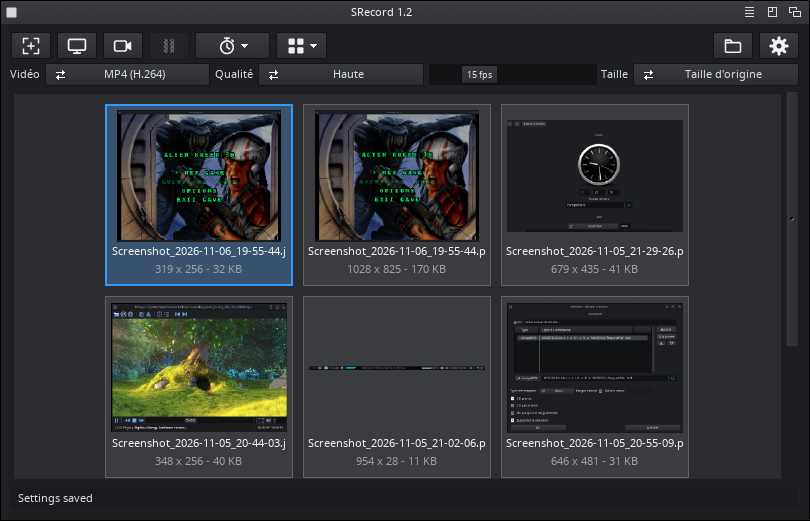
SRecord takes screenshots, edits them and records the screen.
Copy the SRecord drawer anywhere (SYS:Applications/...): nothing else to
install.
SCREENSHOTS
- Capture area: the screen freezes; click a window or drag a region.
Space: whole screen, Esc: cancel. Full screen at once, optional delay.
- A window is captured complete, even covered (Enhanced engine); video
overlays (MPlayer, SDL) too.
- A window that holds the mouse (a game) is captured at once by the
capture keys, without the selector or SRecord's window.
- Saved (PNG or JPEG), copied to the clipboard, opened in the editor.
EDITOR
- Arrows, rectangles, ellipses, text (any outline font), numbered steps,
blur, crop, resize; colour, size, shadow; undo / redo, zoom.
- Every object stays editable, also later. Save copies the picture and
closes the editor; Save as: PNG, JPEG, TIFF, ILBM, datatypes.
VIDEOS
- MP4 (H.264), MPEG-2 or animated GIF of a window, a region, the screen
or a zone that follows the mouse; pointer and clicks, pause, limits.
- A frame only when the screen changes: light files. "Constant frame
rate" option for MPlayer before 1.6.1.
- Reading video memory is the limit (about 30 MB/s on a Mirari): for
smooth videos, record a region, scale 50 %, 10-15 fps.
WORKSPACE
- Previews of all captures, multiple selection, drag and drop in from
Ambient and out to Ambient drawers or to windows that take icons.
- Screen bar icon with a menu; closing the window never quits.
"Start with MorphOS" option.
HOTKEYS (defaults)
Print Screen, ctrl F12 capture area (with Shift: full screen)
ctrl alt s / shift s capture area / full screen
ctrl alt w active window at once
ctrl alt r record / stop video
ctrl alt m record around the mouse / stop
ctrl alt p pause / resume
ctrl alt v show the window
AREXX, SHELL
Port SRECORD: CAPTURE, SCREENSHOT, RECORD, STOP, TOGGLE, PAUSE, RESUME,
REPLAY, STATUS, FRONT.
SRecord [keywords] [START] [NOGUI] [SCREENSHOT]: the keywords of
ENVARC:SRecord.prefs, also as tooltypes.
LANGUAGES
English, French, German, Spanish, Italian, Portuguese, Polish.
The log is on the Log page of the settings and in PROGDIR:SRecord.log.
HISTORY
1.3 (19.11.2026)
- ctrl alt w captures the active window at once; the capture keys do
the same by themselves when a program (a game) holds the mouse.
- Screenshots of a video overlay (MPlayer) no longer mix two pictures.
- Editor: Save as closes like Save; Resize remembers the size typed.
- A drop on an Ambient drawer with a long path works without ARexx.
- Videos: a still screen with the pointer is light again, no black
boxes for SRecord's windows, Stop and Pause work during a dialog, an
exact time limit, and other fixes.
1.2 (06.11.2026)
- MPEG-2 videos; a frame only when the screen changed; recording around
the mouse (M, ctrl alt m); quick video settings in the main window.
- Simpler settings, "Captures kept", a font per text in the editor.
- Fixes: MP4 files, key frames, black bands while recording...
1.1 (03.11.2026)
- Screen bar icon and menu, "Start with MorphOS", icon toolbars,
About box, "Reset to defaults" per page, 7 languages.
1.0 (01.11.2026)
- First release.
SUPPORT
Do you like SRecord? https://www.paypal.com/paypalme/BeWorldMOS
LICENSE
Copyright 2026 BeWorld. GPL (x264 is GPL, FFmpeg LGPL).
|


 Ambient (151)

 SRecord_1.3.lha