| Readme: | Short: Tile windows by dragging them to an edge
Uploader: michele.dipace@kaffeine.net (Michele Dipace)
Author: Michele Dipace <michele.dipace@kaffeine.net>
Type: util/cdity
Version: 0.55
Architecture: ppc-amigaos >= 4.0.0; ppc-morphos
Replaces: util/cdity/edgesnap.lha
WHAT IS NEW IN 0.55
On MorphOS, Expose (Amiga-Tab) showed EdgeSnap with the default tool icon:
it shows each running program with the icon of its file, and the commodity
in C: had none. The installer now puts the commodity's icon beside it; if
you have 0.54, installing 0.55 is enough.
On MorphOS and AROS the preferences window shows EdgeSnap's icon when it is
iconified, and on a screen under 720 lines (640x480, 800x600, a PAL 576) its
pages scroll and the window fits the screen, Save, Use and Cancel included.
On AmigaOS 4 the note under "Show the preview frame" now follows the GUI
settings while the window is open, instead of being read only as it opens.
Snapping works as in 0.54, and edgesnap.library stays 2.27.
For programmers, edgesnap.library now has an SDK, in an archive of its own
on Aminet (dev/misc): the headers, autodocs, the .fd and a small layout
client for the three systems as an example.
Since 0.54, Docks, Margins and the system's "Windows can move off-screen"
have a page of their own in the preferences, Screen, so the window fits a
screen 768 pixels high.
Since 0.53, on AmigaOS 4 without compositing and with windows dragged with
their contents, EdgeSnap shows no preview frame, and the window still snaps:
the moving window carried the frame's pixels along, and the frame left
horizontal lines on the windows until a window could not be read. The
preferences window says so under "Show the preview frame". With compositing
on, or windows dragged as an outline, the frame is there as before.
Since 0.52, on AmigaOS 4, closing one of two windows side by side with its
close gadget, which sits beside the seam, no longer freezes the system:
EdgeSnap asked Intuition to move the seam's handle in front of that window
just as it was going. edgesnap.library 2.27 also tells apart a window opened
where one was just closed, so an exclusion, a layout group or a seam no
longer passes to the new window. The preferences have a Project menu with
About... and Support development....
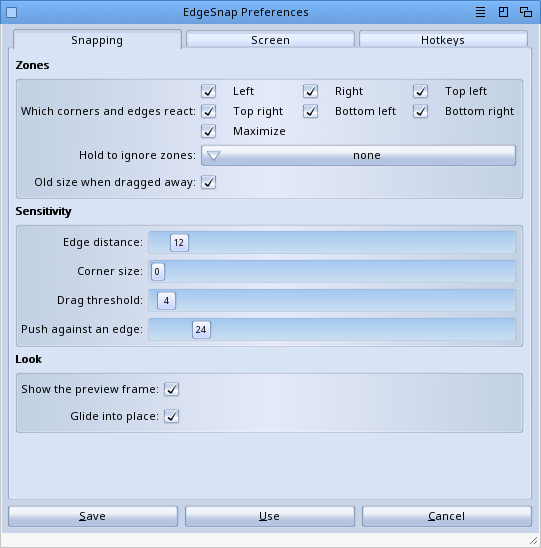
Since 0.51, how far the mouse must push a window held at an edge before that
counts as the edge is a setting: "Push against an edge" on the Snapping page
of the preferences (PUSHPX, 24 pixels as before). On AmigaOS 4 with edge
resistance set in the GUI preferences, the window rests at the edge for a
while, and the push used to snap it when you only meant to lay it against
the edge. At 0 the push is off: a window snaps only once the pointer itself
reaches the edge, after the window has gone past the resistance. This needs
edgesnap.library 2.26, which comes with this version; with an older library
the commodity says so and keeps 24. On AROS, where a window is dragged as an
outline, the push never counted with off-screen moving turned off in
IControl, so a window taken from the middle of the screen did not snap by
drag; now it does.
Version 0.5 made every hotkey changeable on a Hotkeys page of the
preferences and added an ARexx port, EDGESNAP, so a script, a dock button or
a file manager can do what the hotkeys do. Both are under USING IT below.
WHAT IT IS
EdgeSnap gives AmigaOS 4.x, MorphOS and AROS (x86_64, aarch64 and i386) the
window snapping that Windows and macOS users reach for without thinking.
Drag a window against a screen edge or corner and it glides into that half
or quarter of the screen. A frame shows where it will land before you let
go.
Two windows that end up side by side share a seam, and that seam can be
dragged: both windows are resized together, so half and half becomes sixty
and forty. Docks and panels are detected and never covered.
It installs as a commodity that starts with the system, so the behaviour is
simply there. Nobody has to launch anything.
THIS IS A BETA
Version 0.55 is still a beta. I tried the changes on a PowerMac G5 with
MorphOS 3.21, and under emulation on AmigaOS 4.1 Final Edition Update 3 and
AROS One 1.3 x86_64. The snapping itself is the 0.53 code, tested then on a
Sam460ex, a PowerMac G5 with MorphOS 3.20 and AROS One 1.3.
The interface below 1.0 is not frozen. If EdgeSnap covers your dock, misses
your seam or draws something odd, please include the system, version banner,
steps and a screenshot in your report.
Report it here, or to the address at the top of this file:
https://github.com/kaffeine1/edgesnap/issues
INSTALLING
Unpack the archive and double-click Install. It recognises the system,
proposes the matching build, and asks before doing anything: the library
goes to LIBS: and the preferences window to SYS:Prefs/. On AmigaOS 4 and
MorphOS the commodity goes to C: with a line in S:User-Startup. On AROS it
goes to SYS:WBStartup with its icon, and the first preview's copy in C: is
stopped and removed. On the Raspberry Pi and on 32-bit AROS, and on any AROS
whose own Installer cannot copy files, Install does all of this by itself
after one question. Updating is just installing again: the running copy is
stopped and replaced, with no reboot, except that on the Raspberry Pi a new
library takes over at the next boot.
USING IT
- Drag a window's title bar until the POINTER touches an edge or a
corner, then release.
- Grab the seam between two tiled windows (the pointer becomes a
double arrow) and drag it to re-balance them.
- Drag a snapped window away from the edges and it gets back the
size it had before.
- ctrl alt cursor left/right/up snap the active window,
ctrl alt cursor down puts it back where it was, ctrl alt c puts
it in the middle at the size it has, and ctrl alt z opens a
selector under the pointer with all of that on nine cells.
- Every hotkey can be changed on the Hotkeys page of the preferences,
in the icon's tooltypes or from the Shell, and the four quarters
and opening the preferences can be given keys there too.
- The ARexx port EDGESNAP lets a script, a dock button or a file
manager do what the hotkeys do: rx "ADDRESS EDGESNAP 'SNAP LEFT'".
- "Push against an edge" in the preferences sets how far pushing a
window held at an edge counts as reaching it; 0 turns that off.
- Settings live in SYS:Prefs/EdgeSnap, native on each system: ReAction
on AmigaOS 4, MUI on MorphOS, Zune on AROS. EdgeSnap follows changes
at once, without being restarted.
- Exchange enables, disables or removes it, as with any commodity.
- EdgeSnap QUIT stops it from a Shell or a script.
FOR PROGRAMMERS
The behaviour lives in edgesnap.library, not in the commodity: the commodity
is a client of it like any other program can be. Another program can place a
window in a zone or in any rectangle, find and move the seam between two
tiled windows, list the windows with their state, follow their changes and
lay out several windows in one call.
Since 2.10 the library also serves tiling window managers: one client owns
the interactive drag and any number own their layouts, work areas keep an
identity across a screen mode change, and a layout group can keep every
other program, the commodity's drag included, off its windows. Since 2.20 a
group can also keep gaps between its windows and margins from the edges of
the screen. Since 2.24 a tiler can list the seams between the windows of a
group and move each one by a token that names its windows, and a seam
dragged between them keeps the group's gap. The included esnaptest client
exercises the whole API on every system.
The library says 2.27 while EdgeSnap says 0.55, and that is not a mistake: a
library's version is its interface, not its product. While EdgeSnap is below
1.0 treat that interface as not frozen: methods are only ever appended,
never moved or removed, but names and arguments may still change.
THANKS
The icons are by Carlo Spadoni, who drew them for EdgeSnap and let me ship
them with it. The testers on the AROSWorld forum found the black areas in
Wanderer's drawers, the colour left along the seam and the traces of the
preview frame on one graphics driver, each with a video or a log that made
the cause findable. A MorphOS user asked for the old size back when a
snapped window is dragged away, the hotkeys came from a conflict found on
real MorphOS hardware, the author of a tiling window manager asked for the
seams of a group, and an AmigaOS 4 developer reported the snap that edge
resistance set off.
LICENCE AND SOURCE
MIT. The full text is in the LICENSE file inside the archive.
Source, issues and the design notes: https://github.com/kaffeine1/edgesnap
Support my work on Patreon. Contributions are voluntary; no subscription is
required to use this software. https://www.patreon.com/c/kaffeine1
If you prefer a one-time contribution, you can support my work on Ko-fi.
https://ko-fi.com/kaffeine1
|


 Ambient (151)

 EdgeSnap_0.55.lha